


Kimi K3 Self-Hosting vs API: Hardware, Cost & Deployment Guide
 2026-10-07
 1389 Reads
Running Kimi K3 yourself is technically possible. That does not mean it is operationally simple—or economically sensible.
Kimi K3 is a 2.8-trillion-parameter Mixture-of-Experts model with native multimodal capabilities and a context window of up to 1 million tokens. Moonshot's public model repository is roughly 1.56 TB, and official serving guidance starts with a multi-GPU setup rather than a typical developer workstation.
That changes the deployment question.
For most teams, the real decision is not:
“Can we download Kimi K3?”
It is:
“At what scale does self-hosting become more practical than using a hosted API?”
This guide compares Kimi K3 self-hosting with API access across hardware, infrastructure, engineering effort, utilization, cost, licensing, scalability, and operational risk. It also explains when a hosted API, self-hosted cluster, or hybrid approach makes the most sense.
What Does Self-Hosting Kimi K3 Actually Mean?
Self-hosting means your team is responsible for operating the complete inference environment.
That includes:
- Downloading and storing the model weights
- Provisioning GPU infrastructure
- Configuring the inference runtime
- Managing multi-GPU or multi-node communication
- Monitoring GPU memory and utilization
- Handling model upgrades
- Managing failures and restarts
- Scaling for traffic spikes
- Maintaining latency targets
- Securing the deployment
- Operating logging and observability
- Planning capacity
Hosted API access moves most of those responsibilities to the API provider.
The application typically only needs to manage:
API Key
+
Endpoint
+
Model ID
+
Application Logic
That difference matters much more when the model itself is this large.
Why Kimi K3 Is Expensive to Self-Host
Kimi K3 is not a conventional dense model that fits comfortably on one or two high-end GPUs.
Moonshot describes it as a 2.8T-parameter MoE model that activates 16 of 896 experts per token. The model uses Kimi Delta Attention and Attention Residuals and supports native text, image, and video understanding.
Only part of the model is active for each token, but the full model still has to be stored and available to the serving system.
The full expert set must still be stored and made available to the inference system.
That creates requirements around:
- GPU memory
- Model storage
- Fast interconnects
- Distributed inference
- KV-cache management
- Long-context memory
- Load balancing
- Expert routing
For a production team, Kimi K3 is therefore an infrastructure project rather than a simple model download.
Kimi K3 Model Size
The official Hugging Face repository for Kimi K3 is approximately:
1.56 TB
At that size, storage and deployment become part of the problem.
A production deployment needs enough storage not only for the model itself but also for:
- Temporary files
- Container images
- Caches
- Logs
- Model revisions
- Checkpoints
- Monitoring data
Model distribution can also become an operational issue.
If a cluster contains many nodes, repeatedly downloading more than a terabyte of model data can significantly increase deployment time.
Teams may therefore need:
Central Model Storage
↓
High-Speed Network
↓
GPU Nodes
↓
Local Cache
This should be included in infrastructure planning.
Kimi K3 Hardware Requirements
The vLLM team's official Kimi K3 deployment guide says the easiest way to serve the model is with 8 NVIDIA B300 GPUs or 8 AMD MI355X GPUs. That is already far beyond the infrastructure used for many smaller open models.
A simplified deployment architecture could look like:
Application
↓
Load Balancer
↓
Inference Server
↓
8+ High-End GPUs
↓
Kimi K3
Production systems may need additional hardware depending on:
- Number of concurrent users
- Context length
- Output length
- Latency targets
- Tool-heavy agent workflows
- Multimodal traffic
- Required redundancy
Treat that configuration as a starting point, not as a guaranteed production setup.
Long Context Makes Infrastructure More Expensive
Kimi K3 supports up to a 1-million-token context window.
Long context can be valuable for:
- Large repositories
- Long research sessions
- Document collections
- Agent histories
- Multi-file debugging
- Long-form knowledge work
But large context windows also increase memory pressure.
A request containing hundreds of thousands of tokens is very different from a short chat completion.
Infrastructure planning needs to consider:
Longer Context
↓
Larger KV Cache
↓
More GPU Memory
↓
Lower Effective Concurrency
That is why request count alone is not enough for capacity planning.
Two workloads with the same requests per minute may require completely different infrastructure if one consistently uses much longer contexts.
Self-Hosting Requires More Than GPUs
The GPU bill is only one part of the total cost.
A realistic self-hosted deployment may also require:
- CPU servers
- High-speed NVMe storage
- Fast networking
- Load balancers
- Monitoring
- Backup infrastructure
- Container orchestration
- Engineering staff
- Security controls
- Redundant nodes
- Power and cooling for on-premises deployments
A more realistic cost model includes:
Total Self-Hosting Cost

=

GPU Cost

+ Storage

+ Networking

+ CPU / RAM

+ Engineering

+ Monitoring

+ Reliability

+ Idle Capacity
Ignoring these items can make self-hosting appear cheaper than it really is.
Self-Hosting Cost Is Mostly a Utilization Problem
A GPU cluster incurs cost even when nobody is sending requests.
That creates one of the biggest differences between self-hosting and API access.
Consider two applications.
Application A
- Heavy usage during business hours
- Almost no traffic overnight
- Weekend traffic is low
- Occasional sudden spikes
Application B
- Consistent traffic 24/7
- Stable request size
- High GPU utilization
- Predictable demand
Application B is much more suitable for self-hosting.
Application A may spend a significant amount of money on idle capacity.
The key metric is therefore not simply: GPU price
It is: GPU utilization
Example: Why Idle Capacity Matters
Imagine a cluster that costs:
$X per hour
If it operates continuously:
Monthly infrastructure cost

≈

$X × 24 × 30
But if average utilization is only 25%, the business is still paying for the entire cluster.
The effective compute cost per useful request becomes much higher.
A hosted API typically changes the cost structure to something closer to:
Usage
↓
Tokens / Requests
↓
Variable Cost
That can be much cheaper when usage is still low or unpredictable.
Hosted API Cost Structure
Hosted API access usually converts infrastructure spending into variable usage-based spending.
Instead of purchasing or renting a dedicated cluster, the business pays according to the provider's pricing model.
For an LLM API, this is commonly based on:
- Input tokens
- Output tokens
- Cached input
- Requests
- Model-specific usage
The general monthly API cost can be estimated as:
Monthly API Cost

=

(Input Tokens × Input Price)

+

(Output Tokens × Output Price)
If caching is supported:
Monthly API Cost

=

Cached Input Cost

+

Uncached Input Cost

+

Output Cost
That makes it easier to see how infrastructure cost changes with actual product usage.
Self-Hosting vs API: Core Comparison
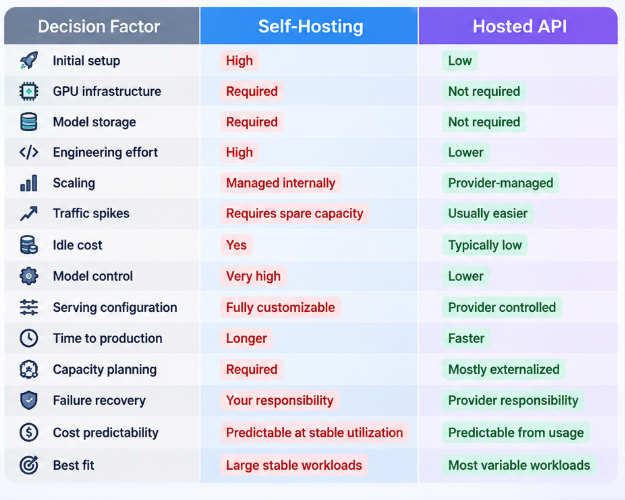
Neither option is always better. The right choice depends on how the workload behaves.
When Hosted API Makes More Sense
A hosted API is usually the more practical option when a team is still validating a product.
1. Your Traffic Is Unpredictable
If demand varies significantly, API access avoids paying for large amounts of idle GPU capacity.
This is common with:
- New products
- Internal prototypes
- Early-stage SaaS
- Seasonal applications
- Experimental agents
2. You Need to Launch Quickly
Self-hosting requires infrastructure preparation.
Hosted access can move a team from prototype to production faster because the inference platform is already managed.
3. You Do Not Have an Inference Infrastructure Team
Running a very large MoE model requires specialized engineering skills.
Teams may need experience with:
- vLLM
- SGLang
- Tensor parallelism
- Expert parallelism
- Distributed serving
- GPU scheduling
- KV cache optimization
- Performance tuning
If those skills are not already available internally, the staffing cost can become significant.
4. You Need Elastic Scaling
API traffic may change dramatically.
For example:
Normal Load

████

Product Launch

████████████████████

Normal Load

████
A self-hosted deployment needs enough spare capacity to survive the peak.
API infrastructure can shift that capacity problem to the provider.
5. You Want to Compare Models
A team may not know whether Kimi K3 is the final model it will use.
Hosted access makes it easier to test several models against the same production workload before making a large infrastructure commitment.
That matters for workloads such as coding agents, research agents, long-context applications, multimodal systems, and enterprise knowledge tools.
When Self-Hosting Makes More Sense
Self-hosting can make sense when several conditions are already true.
Stable High Utilization
If the cluster runs near capacity for most of the day, the economics can become more favorable.
A stable workload allows expensive GPUs to generate value continuously rather than sitting idle.
Existing GPU Infrastructure
Organizations that already operate large GPU clusters have a very different cost profile from teams starting from zero.
They may already have:
- GPU servers
- Networking
- Storage
- Observability
- Platform engineering
- Deployment automation
For those organizations, adding Kimi K3 may cost much less than building the infrastructure from scratch.
Greater Control Is Required
Self-hosting provides more control over:
- Serving configuration
- Quantization
- Scheduling
- Model modifications
- Network architecture
- Data routing
- Logging
- Performance optimization
This can matter in highly customized environments.
You Need Direct Access to the Weights
Moonshot has released Kimi K3's weights publicly under the Kimi K3 License.
That makes research, deployment, and model-level experimentation possible within the terms of the license.
A hosted API does not generally provide the same level of model-level control.
When a Hybrid Deployment Makes Sense
The decision does not have to be binary.
Some teams may benefit from:
Stable Base Traffic
↓
Self-Hosted Kimi K3
Traffic Spike
↓
Hosted API
This approach can reduce idle infrastructure while still allowing the organization to maintain its own baseline serving environment.
A hybrid architecture may also support:
- Disaster recovery
- Capacity overflow
- Provider outages
- Regional failover
- Testing new model versions
For example:
Application
↓
Router
┌───────┴────────┐
↓ ↓
Self-Hosted Hosted API
Base Load Overflow
The application can decide where to send each request based on capacity and policy.
Calculate the Real Break-Even Point
The self-hosting decision should be based on total cost, not just GPU prices or API token rates.
API Cost
Estimate:
API Cost

=

Monthly Input Tokens

× Input Price

+

Monthly Output Tokens

× Output Price
Then include:
- Cache pricing
- Retries
- Failed tasks
- Tool loops
- Large-context requests
Self-Hosting Cost
Estimate:
Self-Hosting Cost

=

GPU Infrastructure

+

Storage

+

Networking

+

Engineering

+

Operations

+

Redundancy

+

Idle Capacity
Then calculate:
Effective Cost Per Successful Task

=

Total Monthly Cost

÷

Successful Production Tasks
This is often more meaningful than cost per token.
Why Cost Per Successful Task Matters More
Suppose Model A is cheaper per token but requires many retries.
Model B is more expensive per token but succeeds more often.
The business cares about:
Cost Per Accepted Result
not simply:
Cost Per Token
For example:
Model A

$0.50 per attempt

50% accepted

≈ $1.00 per accepted result
Model B

$0.70 per attempt

90% accepted

≈ $0.78 per accepted result
This principle is especially relevant for agentic tasks.
A coding agent might spend tokens on:
- Repository exploration
- Planning
- Tool calls
- Debugging
- Test execution
- Revisions
The cheapest token rate does not necessarily produce the cheapest finished task.
Measure Real Workloads Before Buying GPUs
Before committing to self-hosting, teams should collect usage data from real application traffic.
Useful metrics include:
- Average input tokens
- Average output tokens
- P95 context size
- Requests per minute
- Peak concurrency
- Tool calls per task
- Retry rate
- Successful-task rate
- Average latency
- P95 latency
- Cache hit rate
- Daily traffic distribution
- Cost per successful task
After several weeks, these metrics can be used to estimate the infrastructure needed for self-hosting.
Without them, capacity planning is mostly guesswork.
Benchmark With Your Workload, Not Generic Scores
Kimi K3 is designed for long-horizon coding, knowledge work, multimodal reasoning, and agentic workloads. Moonshot describes it as capable of sustained engineering sessions, large-repository navigation, terminal orchestration, and end-to-end knowledge work.
But public benchmarks cannot determine your production economics.
A better evaluation might contain:
100 Real Coding Tasks
+
100 Research Tasks
+
50 Multimodal Tasks
+
50 Long-Context Tasks
For each task, measure:
- Accuracy
- Completion rate
- Latency
- Token usage
- Retry count
- Human acceptance
- Cost
Those results will usually tell you more than a public benchmark score.
Self-Hosting Creates More Operational Risk
Self-hosting also means your team owns failure recovery.
Common infrastructure problems can include:
- GPU failure
- Node failure
- Network degradation
- Out-of-memory errors
- Model server crashes
- Cache corruption
- Deployment failures
- Capacity shortages
A production setup needs enough redundancy to survive those failures.
For example:
Request
↓
Load Balancer
↓
Healthy Inference Pool
↓
Kimi K3 Cluster
If one node fails, the system must continue serving traffic.
Redundancy increases reliability—but also increases cost.
Model Updates Are Another Cost
A model deployment is not a one-time project.
New versions may require:
- Downloading new weights
- Updating serving software
- Compatibility testing
- Benchmarking
- Canary deployments
- Rollbacks
With a hosted API, much of that infrastructure work is handled externally.
With self-hosting, your team owns the full lifecycle.
API Access Can Be a Validation Stage
For many teams, the most practical strategy is:
Phase 1
Prototype Through API
↓
Phase 2
Measure Real Usage
↓
Phase 3
Calculate Infrastructure Cost
↓
Phase 4
Decide Whether to Self-Host
This makes the self-hosting decision evidence-based.
Instead of estimating workload behavior, you measure it.
How ApiSmart Fits Into the Hosted API Strategy
ApiSmart lets developers access supported models through one API layer.
Teams can test Kimi K3 through ApiSmart without building a separate provider integration first.
A simplified architecture looks like:
Your Application
↓
ApiSmart
↓
Kimi K3
The current ApiSmart base URL is:
https://gw.apismart.ai/v1
When implementing Kimi K3, use the exact model identifier currently shown in the ApiSmart dashboard or documentation.
For examples where the model ID has not been independently verified, use:
YOUR_KIMI_K3_MODEL_ID
A Practical Decision Framework
A simple decision tree can help.
Do you already operate large GPU infrastructure?
│
┌─────┴─────┐
│ │
No Yes
│ │
Hosted API Is traffic stable?
│
┌────┴────┐
│ │
No Yes
│ │
Hosted API Is utilization high?
│
┌────┴────┐
│ │
No Yes
│ │
Hosted/Hybrid Evaluate
Self-Hosting
Open weights alone are not a good reason to self-host.
When API Access Is Probably the Better Choice
API access is usually the stronger starting point when:
- You are still validating Kimi K3
- Traffic is unpredictable
- Usage is low or medium
- You need fast deployment
- You lack GPU infrastructure
- You do not have an inference engineering team
- You want access to several models
- Traffic contains major peaks
- You want to avoid idle GPU costs
When Self-Hosting Is Worth Serious Evaluation
Self-hosting becomes more reasonable when:
- You already operate high-end GPU infrastructure
- Your workload is predictable
- GPU utilization will remain high
- Kimi K3 is a core long-term dependency
- You need low-level serving control
- You require direct model-weight access
- Your team has distributed inference expertise
- The total-cost model shows a meaningful advantage
When Hybrid Deployment Is Attractive
Hybrid deployment can be useful when:
- Base traffic is predictable
- Peak traffic is unpredictable
- You want self-hosted control but need overflow capacity
- You need an external fallback
- You want gradual migration from API to self-hosting
A hybrid setup avoids locking the team into only one deployment model.
Frequently Asked Questions
Can Kimi K3 be self-hosted?
Yes. Kimi K3 has open weights which makes self-hosting technically feasible. However, it requires a multi-GPU datacenter cluster and dedicated machine learning engineering resources. It cannot run on a single workstation or consumer GPUs. As an alternative, developers can access Kimi K3 through the managed ApiSmart API.
How large is Kimi K3?
Kimi K3 is a Mixture-of-Experts (MoE) model with 2.8 trillion total parameters. Only approximately 103 billion parameters are activated for each token during inference.
What GPUs are needed for Kimi K3?
The vLLM Kimi K3 deployment guide says the easiest serving configuration is 8 NVIDIA B300 GPUs or 8 AMD MI355X GPUs. Production requirements may be higher depending on traffic and context length.
Does Kimi K3 support long context?
Yes. Kimi K3 features a native 1-million-token context window.
Is Kimi K3 open source?
Kimi K3 is open-weight rather than fully open-source under licenses like MIT or Apache. It uses a custom Kimi K3 license. Most commercial usage is allowed, but large-scale SaaS services with high revenue or MAU need a separate agreement with Moonshot AI.
Is self-hosting cheaper than using an API?
Not automatically. Self-hosting becomes more attractive when utilization is consistently high and the organization already has the infrastructure and engineering capability required to operate the model. API access is often more economical for variable or early-stage workloads.
Should startups self-host Kimi K3?
For most startups without existing large-scale GPU infrastructure, a hosted API is generally a lower-risk starting point. Real usage data can then be used to evaluate whether self-hosting makes economic sense later.
What should I measure before self-hosting?
Before self-hosting, measure average and peak traffic, context length, concurrency, latency, retry rate, cache usage, successful-task rate, and cost per successful task. These numbers are needed to estimate the GPU capacity and total infrastructure cost.
Can I use Kimi K3 through ApiSmart?
Yes. You can access Kimi K3 via ApiSmart’s unified, OpenAI-compatible API.
Conclusion
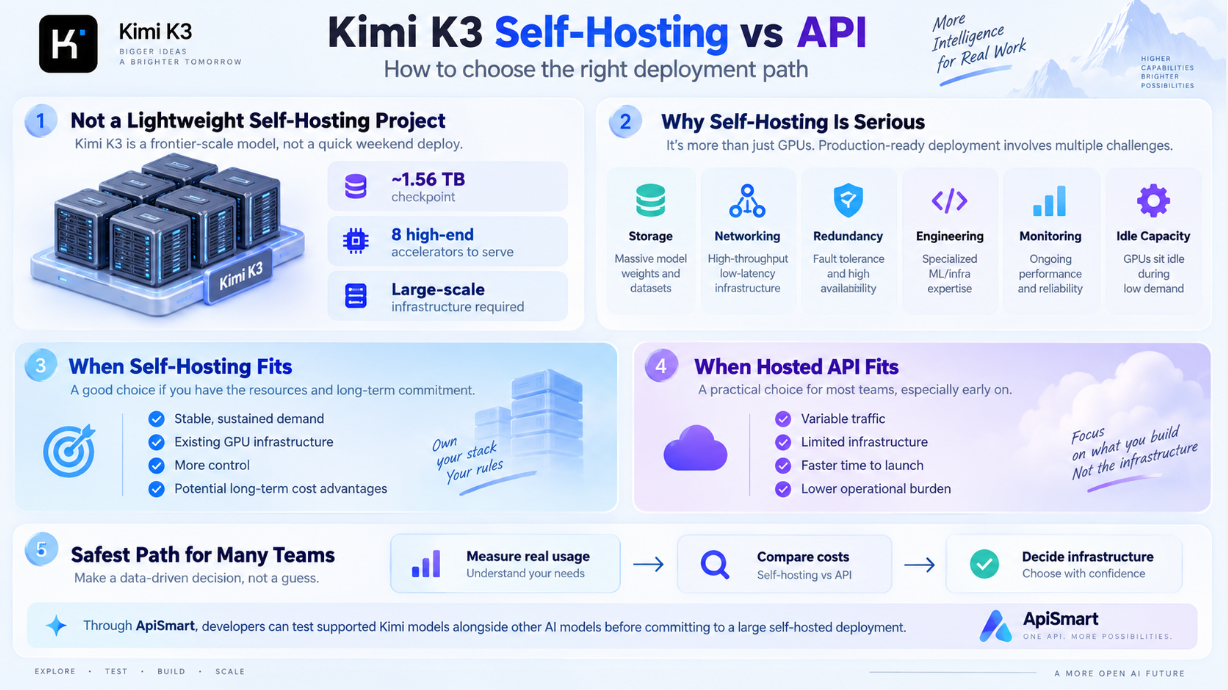
Kimi K3 being openly available does not make it a lightweight self-hosting project.
The model is enormous, the official checkpoint is roughly 1.56 TB, and serving guidance begins with eight high-end accelerators. Once storage, networking, redundancy, engineering, monitoring, and idle capacity are included, self-hosting becomes a serious infrastructure commitment.
For teams with stable, sustained demand and existing GPU infrastructure, self-hosting may provide greater control and potentially better long-term economics.
For teams with variable traffic, limited infrastructure, or a need to move quickly, hosted API access is usually the more practical starting point.
For many teams, the safest approach is to measure real usage before investing in infrastructure.
Through ApiSmart, developers can test supported Kimi models alongside other AI models before committing to a large self-hosted deployment.