


What Are OpenAI Dots? A Practical Guide to Always-On AI Agents
 2026-10-23
 1432 Reads
Most AI assistants wait for a prompt, produce a response and then stop.
OpenAI Dots work differently. A dot can receive an ongoing responsibility, retain relevant project context, continue making progress between conversations and return when it has results or needs a human decision.
That makes a dot feel more like an ongoing assistant than a normal chat session . They can monitor changing information, coordinate tasks and continue projects without requiring the user to restart the context each time.
However, “always on” does not mean unlimited work, unrestricted access or fully independent action. Dots operate within connected-app permissions, approval rules, usage allowances and built-in safety controls.
This article explains what OpenAI Dots are, what they can do, where their boundaries are and when a custom API-based agent may be a better fit.
What Are OpenAI Dots?
OpenAI describes Dots as proactive assistants that can keep working on ongoing projects and responsibilities.
A user gives a dot a goal, context and boundaries. The dot can then:
- Plan the next steps
- Work between conversations
- Track project progress
- Use connected applications
- Operate its own cloud computer
- Coordinate delegated background work
- Return results for review
- Ask for decisions when human judgment is required
- Adapt when requirements or priorities change
Dots run inside ChatGPT as a managed agent experience powered by GPT-6 Astra. They are not a separate foundation model that developers call by sending a model ID to a standard API endpoint.
This distinction is important. Calling an underlying language model does not automatically provide the persistent memory, cloud computer, scheduling, permissions or approval system included with Dots.
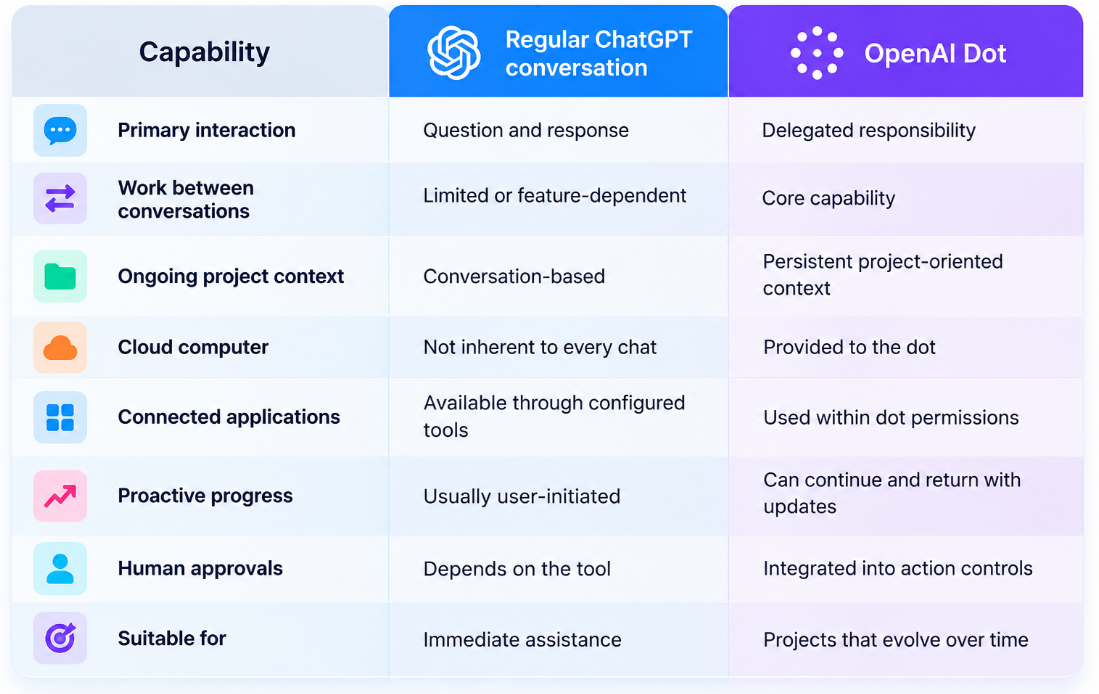
How Dots Differ From Regular ChatGPT Conversations
A regular chat usually waits for the user to continue. A dot can keep working on an assigned responsibility between conversations.
A dot can continue working after the immediate conversation ends.
Once it has an ongoing responsibility, it can track changes, continue the work when needed, and return with an update . It may pause and resume without requiring a fixed schedule for every step, and it can use background agents to work on several tasks while the user continues talking to it.
OpenAI Dots Are a Product Layer, Not an API Model
The term “OpenAI Dots API” can be misleading.
Dots combine several components:
- A foundation model
- Persistent context
- Task planning
- Background execution
- Cloud-computer access
- Application connections
- Scheduling
- Memory
- Permissions
- Approval workflows
- Activity tracking
- Safety monitoring
A normal model API provides only part of this stack. Developers building a similar agent must supply the remaining orchestration and governance layers themselves.
At the time of writing, OpenAI presents Dots as an agent feature inside ChatGPT rather than a standalone model endpoint that can be accessed through third-party model aggregators.
Using a model through ApiSmart does not create an OpenAI Dot .ApiSmart can instead provide the model layer for developers building their own persistent agents.
What Can OpenAI Dots Do?
OpenAI presents Dots as useful for work that continues over time and changes as new information arrives.
1. Software Development
A dot can monitor customer feedback, identify recurring requests, scope smaller improvements, implement changes, run tests and prepare pull requests for review.
The developer still reviews and approves the changes, while the dot handles much of the investigation, implementation, and testing .
OpenAI specifically describes a workflow in which a dot turns customer feedback into tested fixes and returns complete pull requests with videos demonstrating the changes.
2. Product Launches
Launch plans change . Product scope, positioning, deadlines and creative requirements can change.
A dot can:
- Track updated requirements
- Revise launch plans
- Prepare new content drafts
- Update related documents
- Identify unresolved dependencies
- Notify the team when approval is required
This is different from asking a chatbot to produce a single launch plan. The responsibility remains active as the project changes.
3. Research and Analysis
A research dot can monitor new evidence, rerun analyses and update reports.
Possible tasks include:
- Watching selected information sources
- Organizing new evidence
- Recalculating results
- Updating charts
- Revising supporting explanations
- Flagging conflicting findings
- Preparing review-ready documents
Human review remains important, particularly when the work affects scientific, medical, legal or financial decisions.
4. Content Workflows
A dot can help transform interviews, transcripts and source material into:
- Show notes
- Social-media drafts
- Article outlines
- Video clip recommendations
- Content calendars
- Updated campaign assets
Because it receives feedback over time, it can carry approved changes across related materials rather than treating each draft as an isolated request.
5. Sales and Enterprise Projects
For an ongoing enterprise opportunity, a dot could compare customer requirements with product documentation, identify unanswered technical questions and update a proposal as tests or requirements change.
The sales team can retain control over promises made to the customer while delegating research, documentation and coordination work.
Where Can Users Interact With a Dot?
Dots are available through supported ChatGPT experiences, including desktop, web and mobile applications.
OpenAI also documents interaction through messaging platforms such as Slack and Microsoft Teams. A dot can preserve relevant context across supported channels rather than requiring the user to recreate the project in every interface.
Simply adding a dot to a channel does not necessarily authorize it to monitor everything. Users must define what it should watch and what actions it may take.
Availability and Usage Allowances
OpenAI states that the first dot is included with eligible Pro and Business Premium plans. It can remain available for conversation and ongoing assistance, while deeper work is governed by a separate allowance.
OpenAI also says that users will eventually be able to add more Dots and scale either their execution speed or the amount of work they can complete each month.
Availability may vary by:
- Subscription plan
- Country or region
- Workspace settings
- User age
- Administrative approval
- Product rollout stage
Organizations should verify current availability and usage limits directly in their ChatGPT account.Having a dot included in a plan does not mean unlimited background work.
Permissions and Human Approval
Because Dots can keep working and interact with connected apps, permissions and approvals matter more than they do in a normal chat .
Dots use several layers of control:
- Existing application permissions
- Built-in safety requirements
- Action-specific approval checks
- Optional custom rules
- Human handoffs
- Activity review
- Pause and stop controls
Before an action affects an account or shares information, an automatic review evaluates the action against the user’s instructions, permissions and safety requirements.
Depending on the action, the dot may proceed, ask for approval, or hand the step back to the user.
Custom Rule Options
Users can define rules such as:
|
Rule |
Intended behavior |
|
Take action without asking |
Perform the defined action within the approved scope |
|
Take action when instructed |
Act after an explicit request |
|
Ask before taking action |
Request approval immediately before the action |
|
Hand off to the user |
Require the user to perform the action |
For example, a dot may be allowed to draft customer emails but required to ask before sending them. Deleting shared files could always be handed off to the user.
Custom rules do not override built-in safety requirements or grant access to an application that has not been connected.
Proactive Research Is More Restricted Than Directly Authorized Work
Dots can look for relevant updates before receiving a new request. OpenAI calls this proactive research.
During proactive research, the dot can read information from permitted connected sources and save private notes. Those research tools cannot directly:
- Send messages
- Change application content
- Control a browser
- Control a computer
A subsequent action must pass the normal permission and safety checks.
The distinction is simple:
- Reading and identifying an opportunity can happen proactively.
- Acting on that opportunity requires the applicable permission or approval.
Memory and Data Boundaries
A dot can receive memory and recent conversation context from ChatGPT. Conversations with the dot may also contribute to ChatGPT memory.
Turning off ChatGPT Memory stops future sharing, but it does not automatically erase information the dot previously received. Users should therefore review memory and data controls before assigning sensitive work.
Teams should decide in advance:
- Which data sources the dot may access
- Which projects contain confidential information
- What information may be retained
- Which actions require approval
- How work should be audited
- When an ongoing responsibility should end
Pausing a Dot Is Not the Same as Stopping Everything
Persistent work creates several different kinds of state.
OpenAI distinguishes among:
- Pausing the dot’s main task
- Stopping a delegated background task
- Canceling a scheduled task
- Deleting the dot
Pausing the main task does not necessarily stop every delegated job or remove future schedules. Completed actions are not automatically reversed when work is stopped.
Users should review active work and scheduled tasks separately before assuming that all activity has ended.
OpenAI Dots vs Codex vs ChatGPT Work vs Custom Agents
|
Option |
Best suited for |
Persistence |
Level of customization |
|
Regular ChatGPT |
Questions, writing and analysis |
Conversation-oriented |
Moderate |
|
OpenAI Dots |
Ongoing personal or team responsibilities |
Built in |
Managed product controls |
|
Codex |
Software development and repository tasks |
Task and environment dependent |
Development-focused |
|
ChatGPT Work |
General knowledge work and computer tasks |
Workflow dependent |
Managed tools and apps |
|
Custom API agent |
Product-specific automation |
Developer implemented |
Highest |
Choose a dot when you want an ongoing agent inside ChatGPT without building the orchestration yourself.
Choose a custom API agent when you need:
- A user-facing product rather than a personal assistant
- Precise control over the workflow
- Custom memory and retrieval
- Provider-independent model routing
- Application-specific tools
- Detailed cost attribution
- Custom approval logic
- Your own user and permission system
- Deployment outside ChatGPT
How Developers Can Build a Dot-Like Agent
A persistent API agent requires more than a model call.
A practical architecture includes:
- Goal store
Records the ongoing responsibility, scope and success criteria. - State and memory
Stores completed steps, decisions, evidence and unresolved questions. - Scheduler or event system
Wakes the agent when a timer expires or new data arrives. - Planner
Chooses the next safe step based on the current state. - Model layer
Performs reasoning, extraction, generation and tool selection. - Tool gateway
Provides controlled access to applications and internal services. - Permission engine
Determines whether an action is allowed, requires approval or must be denied. - Validation layer
Checks generated code, structured data and business rules. - Human approval queue
Presents high-impact actions for review. - Audit log
Records prompts, model versions, tools, approvals and outcomes. - Budget controls
Limits tokens, tool calls, runtime and parallel work. - Stop conditions
Define when the goal is complete, obsolete or unsafe to continue.
A Basic Persistent-Agent Loop
A simplified agent workflow might look like this:
Receive goal
    |
    v
Load current state and permissions
    |
    v
Check for new events or information
    |
    v
Choose the next action
    |
    +-- Read-only action ------> Execute and update state
    |
    +-- Validated internal task -> Execute, test and record
    |
    +-- External side effect ---> Request approval
    |
    +-- Unsafe or unclear ------> Pause and notify user
    |
    v
Evaluate completion or schedule next run
A model should not be the only component deciding whether its own action is safe. Permissions and validation should be enforced by application code.
Using ApiSmart as the Model Layer
ApiSmart lets developers access supported models through the same OpenAI-compatible API .
It does not provide the managed Dots product itself, but it can supply the model layer for a custom persistent agent.
The standard ApiSmart base URL is:
https://gw.apismart.ai/v1
A basic Python request looks like this:
import os
from openai import OpenAI

client = OpenAI(
    api_key=os.environ["APISMART_API_KEY"],
    base_url="https://gw.apismart.ai/v1",
)

response = client.chat.completions.create(
    model=os.environ["APISMART_MODEL_ID"],
    messages=[
        {
            "role": "system",
            "content": (
                "You are the planning component of a persistent agent. "
                "Return one next action. Never perform external actions directly. "
                "Mark actions with side effects as requiring approval."
            ),
        },
        {
            "role": "user",
            "content": """
Goal: Monitor product feedback and prepare weekly improvement proposals.

Current state:
- 43 new feedback items
- 12 items already classified
- No implementation has been approved

Return JSON with:
- next_action
- reason
- required_tool
- approval_required
- completion_condition
""",
        },
    ],
)

print(response.choices[0].message.content)
The exact model ID should be copied from the current ApiSmart model catalog.
The surrounding application—not the model—must store the goal, trigger future runs, execute tools, enforce permissions and request approvals.
Why Use a Multi-Model API for Persistent Agents?
A persistent agent may use different models for different jobs, for example, a fast model for classification, a reasoning model for planning, a coding model for implementation, and a multimodal model for screenshots.
ApiSmart allows supported models to be accessed through a shared API structure, helping teams centralize authentication and switch models without maintaining a separate integration for every provider.
That lets the agent use a stronger model only when the task actually needs one.
Production Safeguards for Custom Agents
Before allowing an agent to run continuously, implement:
- Least-privilege tool access
- Read-only defaults
- Explicit approval for external side effects
- Per-task token and cost budgets
- Maximum tool-call limits
- Idempotency controls
- Timeouts
- Loop detection
- Source and evidence tracking
- Structured-output validation
- Versioned prompts
- Complete audit logs
- Emergency stop controls
- Goal-expiration rules
- Human ownership for every ongoing responsibility
A persistent goal should also have a stale-state policy. If the project is canceled, the customer requirement changes or the original assumption becomes invalid, the agent should pause rather than continue producing obsolete work.
OpenAI Dots or a Custom API Agent?
Choose Dots when you want a managed agent inside ChatGPT with built-in memory, cloud execution, connected apps, and controls. Build a custom API agent when it needs to live inside your own product, use custom tools and business logic, support external users, or give you full control over memory, model routing, permissions, and compliance.
Some organizations may use both: Dots for internal knowledge work and custom API agents for customer-facing products or specialized operational workflows.
When Do Dots Make Sense?
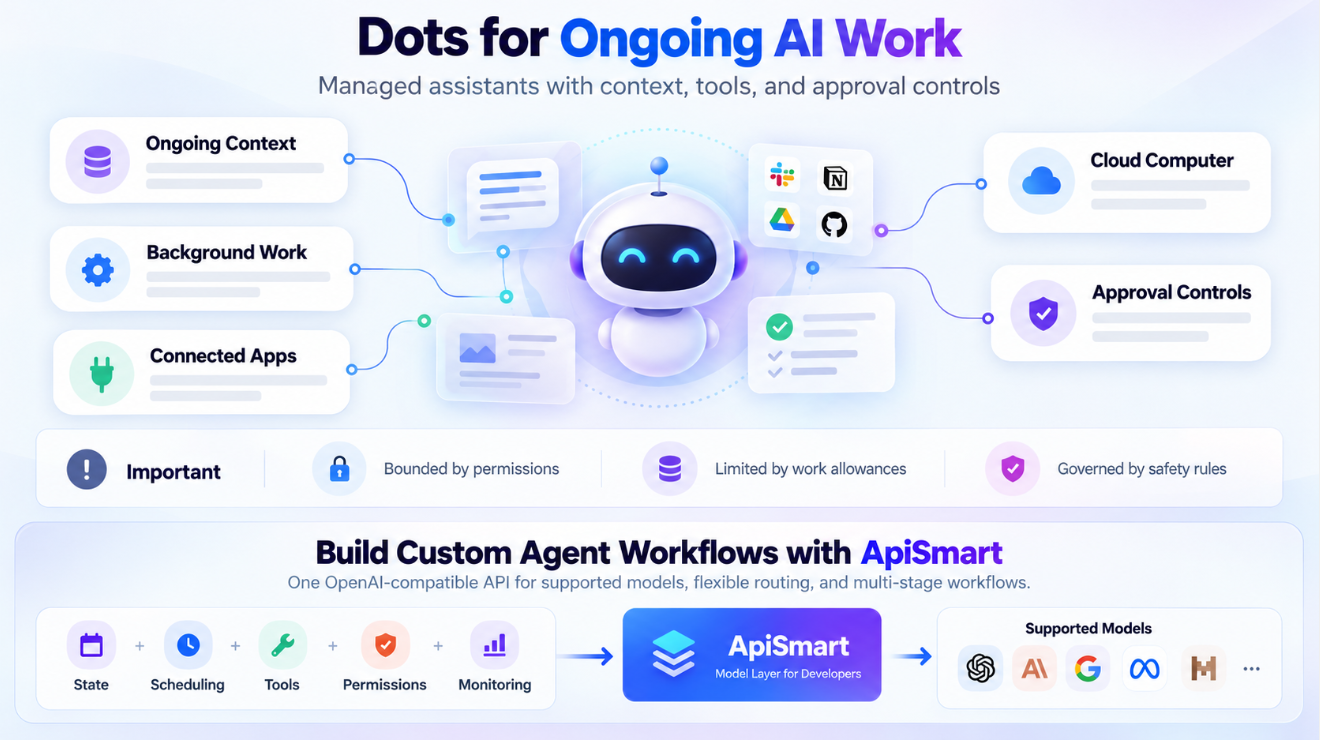
Dots are designed for work that does not end after one prompt.
What makes them different is the combination of ongoing context, background work, connected apps, cloud-computer access, and approval controls inside one managed product.
Dots are still bounded by plan availability, permissions, work allowances and safety rules. They should not be described as unrestricted autonomous workers or as a model API that any developer can call directly.
For teams that want a managed assistant inside ChatGPT, Dots provide a direct path to ongoing AI-supported work.
For developers, the main lesson is that a persistent agent needs much more than a good model. It also needs state, scheduling, tools, permissions, validation, monitoring, and clear stop conditions.
ApiSmart can provide the model layer for that kind of custom agent, giving developers access to supported models through one OpenAI-compatible API and allowing different stages of the workflow to use different models.
Frequently Asked Questions
What are OpenAI Dots?
Dots are persistent agents in ChatGPT that can continue making progress between conversations, use connected applications and return results or decisions for review.
Are OpenAI Dots a new AI model?
No. Dots are a managed agent product powered by GPT-6 Astra. The product also includes memory, cloud execution, connected applications, permissions and approval controls.
Is there an OpenAI Dots API?
OpenAI currently presents Dots as a ChatGPT product experience rather than a standalone model endpoint. Developers can build similar persistent agents with model APIs, but they must implement orchestration, memory, tools and controls.
Can ApiSmart provide access to OpenAI Dots?
ApiSmart provides access to supported AI models, not the managed Dots product. Developers can use ApiSmart as the model layer when building their own persistent agent.
Do Dots work without human approval?
Some actions may run within predefined permissions, while others require approval or human handoff. Users can review activity, manage permissions and define custom rules.
Can a dot send messages or change connected applications during proactive research?
Its proactive research tools are read-only. Follow-up actions must pass the normal permission, approval and safety checks.
Are Dots available on every ChatGPT plan?
OpenAI states that the first dot is included with eligible Pro and Business Premium plans. Availability can depend on region, account type and workspace settings.
What happens when a dot is paused?
Pausing the main dot task may not stop every delegated task or cancel future schedules. Users should review active and scheduled work separately.
How can I build a Dot-like agent?
Combine a model API with persistent state, memory, event triggers, tools, approval workflows, validation, monitoring, budgets and stop conditions.