


DeepSeek V4.1 Flash vs V4 Pro: Which Model Fits Production Workloads?
 2026-10-24
 1454 Reads
DeepSeek V4.1 Flash changes the usual relationship between a “Flash” model and a “Pro” model.
A Flash model would normally trade intelligence for lower latency and cost. V4.1 Flash does not fit that simple pattern. DeepSeek reports that the newer model exceeds V4 Pro across several coding, terminal, automation and agent evaluations while using a more efficient architecture.
That does not mean V4 Pro has become irrelevant for every workload. Its remaining strengths are concentrated in selected pure-reasoning tasks, and existing applications may depend on its established behavior.
So the real question is not which model sounds more powerful . It is whether a workload benefits more from agent execution, native vision and throughput—or from preserving V4 Pro behavior and performance on specific reasoning tasks.
The Short Answer
Choose DeepSeek V4.1 Flash when you need:
- Coding and repository-level automation
- Terminal-based agents
- Tool calling and workflow execution
- Native image understanding
- High request throughput
- Efficient long-context processing
- Lower inference costs
- A new default model for general production workloads
Continue evaluating DeepSeek V4 Pro when you need:
- Compatibility with an existing V4 Pro workflow
- Reproduction of previous V4 Pro results
- Strong performance on selected closed-book reasoning tasks
- A controlled migration rather than an immediate model replacement
- Stable behavior for prompts already optimized around V4 Pro
For most new applications, V4.1 Flash is the better place to start . Production systems with established V4 Pro prompts should run a structured migration test before changing their model configuration.
DeepSeek V4.1 Flash vs V4 Pro at a Glance
|
Category |
DeepSeek V4.1 Flash |
DeepSeek V4 Pro |
|
Main priority |
Capability with higher efficiency |
Flagship reasoning and established behavior |
|
Architecture |
Causal encoder-decoder MoE |
Large sparse MoE |
|
Backbone parameters |
552B |
1.6T |
|
Active parameters |
8B during input, 16B during output |
Approximately 49B per token |
|
Context window |
Up to 1 million tokens |
Up to 1 million tokens |
|
Thinking mode |
Supported |
Supported |
|
Non-thinking mode |
Supported |
Supported |
|
Native image understanding |
Yes |
No |
|
Coding and agent workloads |
Generally stronger in published evaluations |
Strong, but behind V4.1 Flash on many execution tasks |
|
Selected pure-reasoning tests |
Strong |
Retains an advantage in some tests |
|
Serving efficiency |
Higher |
Lower |
|
Best fit |
New, high-volume and multimodal applications |
Legacy compatibility and selected reasoning workloads |
Model specifications and API limits can vary by platform or route. Confirm the current model ID, context limit and supported parameters in the ApiSmart dashboard before deployment.
Why V4.1 Flash Is Not Just a Smaller V4 Pro
The architectural difference matters because input processing and output generation do not always need the same amount of compute.
Long-context agents may process a large amount of input before generating a relatively short answer. Traditional architectures can apply a similar active-parameter budget throughout both stages, increasing the cost of processing the prompt.
DeepSeek V4.1 Flash uses a causal encoder-decoder architecture with an asymmetric compute pattern:
- Approximately 8 billion parameters are active during input processing.
- Approximately 16 billion parameters are active during output generation.
The model has 552 billion backbone parameters in total.That lets the model use less compute while reading the prompt and more while generating the answer.
V4 Pro uses a much larger sparse mixture-of-experts design, with approximately 1.6 trillion backbone parameters and a higher active-parameter count per token.
A larger total parameter count does not automatically produce a better result for every task. Architecture, training, post-training, tool configuration and the amount of active computation all affect practical performance.
Long-Context Efficiency and KV Cache
Long-context applications are often limited by more than model intelligence.
When an agent repeatedly processes a growing conversation, repository or tool history, its key-value cache consumes accelerator memory, storage and data-transfer bandwidth. These infrastructure requirements can become a major part of serving cost.
DeepSeek reports that V4.1 Flash reduces its global KV-cache footprint to approximately 890 bytes per token. Its technical paper describes this as roughly one quarter of the corresponding footprint of the previous V4 Flash generation. Persistent cache requirements can fall to approximately one eighth of the earlier level.
In practice, that can mean:
- Lower long-context serving costs
- Better throughput under heavy workloads
- More efficient repeated prompts
- Improved scalability for long-running agents
- Less infrastructure pressure during large-context processing
However, a one-million-token context window should not be treated as a reason to send every available file in every request. Retrieval and context selection remain essential.
Coding and Repository Work
V4.1 Flash’s biggest advantages appear in software tasks where the model has to actually do the work, not just answer a reasoning question .
These workloads include:
- Repository investigation
- Multi-file code changes
- Terminal operations
- Program synthesis
- Automated debugging
- Test generation and execution
- Security analysis
- Tool-assisted software engineering
A production coding model should be evaluated by whether it completes the task, not merely whether it produces plausible code.
A useful evaluation workflow is:
- Give both models the same repository snapshot.
- Use the same system prompt and available tools.
- Assign the same issue or failing test.
- Allow an equal time and token budget.
- Run the generated patch against the test suite.
- Record tool calls, retries and human corrections.
- Compare successful completion cost.
That tells you much more than comparing answers to isolated coding prompts.
DeepSeek’s published evaluations indicate that V4.1 Flash improves on V4 Pro across several terminal, repository, automation and agent benchmarks. The improvements do not prove that it will win on every private codebase, so teams should still test representative internal tasks.
Pure Reasoning: Where V4 Pro May Still Matter
V4.1 Flash does not win every published comparison.
V4 Pro retains an advantage on selected closed-book evaluations, including GPQA Diamond and comparable text-only HLE results in the referenced benchmark set.
This matters for workloads such as:
- Difficult scientific questions without external tools
- Abstract reasoning problems
- Expert-level knowledge evaluation
- Tasks where the model must reason entirely from supplied knowledge
- Existing workflows calibrated around V4 Pro behavior
That does not make V4 Pro universally better at reasoning. Its advantage is narrower: some tasks without tools or visual input may still favor it .
If a production application handles technical or scientific decisions, create a domain-specific reasoning set and evaluate both models with blind scoring.
Native Vision Changes the Decision
DeepSeek V4.1 Flash supports native image understanding, while the current V4 Pro API route does not list vision support.
That gives V4.1 Flash a clear advantage for:
- Screenshot-based debugging
- User-interface inspection
- Document image extraction
- Chart interpretation
- Visual question answering
- Browser agents
- Computer-use workflows
- Product and equipment image analysis
A frontend agent, for example, can receive a rendered screenshot, identify visible layout problems, modify the code and inspect the updated page.
With V4 Pro, the same workflow would require a separate vision model or an additional image-processing stage.That adds another model, more routing, and more places for the workflow to fail.
Throughput and Concurrency
The current DeepSeek API documentation lists a concurrency limit of 2,500 for V4.1 Flash and 500 for V4 Pro.
Higher concurrency matters more for:
- AI coding platforms
- Batch document processing
- Enterprise assistants
- Customer-support systems
- Automated evaluation pipelines
- Multi-tenant agent products
- Applications with unpredictable traffic spikes
A higher documented limit does not guarantee lower latency for every request. Prompt size, output length, reasoning mode, provider load and routing conditions still affect response time.
Teams should measure:
- Time to first token
- Total response time
- Tokens generated per second
- Queue time
- Error and retry rates
- Performance under concurrent load
- Cost per successful request
Cost Should Be Measured Per Completed Task
V4.1 Flash is listed at substantially lower official token rates than V4 Pro across cached input, uncached input and output. Official pricing can change, and ApiSmart pricing may differ from the first-party DeepSeek schedule. Check the live ApiSmart model list before preparing a budget.
Token price alone is not enough to estimate production cost.
A better formula is:
Cost per completed task = total model and tool cost ÷ number of successfully completed tasks
The calculation should include:
- Input and output tokens
- Prompt-cache performance
- Model retries
- Tool calls
- Failed actions
- Validation requests
- Human review
- Escalation to another model
A more expensive model can be economical if it completes a task in one attempt. A cheaper model can become expensive if it repeatedly calls the wrong tool or generates unusable output.
V4.1 Flash looks attractive for high-volume agents because of its lower rates and strong execution results, but the final decision should still come from end-to-end testing .
Thinking and Non-Thinking Modes
Both models support thinking and non-thinking operation.
Use non-thinking mode for:
- Classification
- Data extraction
- Simple rewriting
- Short summaries
- Routine formatting
- Low-latency conversational responses
Use thinking mode for:
- Complex debugging
- Architecture analysis
- Repository-level changes
- Multi-step planning
- Security investigation
- Difficult reasoning
- Tool-driven agents
Do not use maximum reasoning for every request by default.Choose the mode based on task difficulty, and increase reasoning only when the task actually needs it.
One possible policy is:
|
Task category |
Initial mode |
Escalation condition |
|
Classification and extraction |
Non-thinking |
Invalid structure or low confidence |
|
General coding |
Thinking |
Tests fail after the first patch |
|
Repository repair |
Thinking |
Missing evidence or incomplete test coverage |
|
Visual inspection |
Non-thinking or thinking |
Multiple interacting defects |
|
Research |
Thinking |
Conflicting sources or uncertain conclusion |
|
Tool agent |
Thinking |
Repeated tool failure or plan deviation |
Confirm the exact thinking-mode parameter format supported by the current ApiSmart route before using it in production.
Should Existing V4 Pro Applications Migrate?
Most teams should test V4.1 Flash, but a compatible API does not mean the model will behave exactly like V4 Pro.
A model change can affect:
- Tool selection
- JSON formatting
- Reasoning length
- Token usage
- Prompt sensitivity
- Code style
- Refusal behavior
- Image processing
- Latency
- Cache performance
A safe migration process includes the following stages.
1. Create a Representative Evaluation Set
Collect real prompts from production rather than building only artificial examples.
Include:
- Common requests
- Difficult requests
- Previously failed cases
- Long-context tasks
- Tool calls
- Structured-output requests
- High-impact edge cases
2. Run Both Models With the Same Conditions
Keep the following variables consistent:
- System prompt
- Tool definitions
- Context
- Sampling settings
- Retry policy
- Time limit
- Maximum output
- Evaluation criteria
3. Evaluate End-to-End Results
Measure whether the final task succeeded. Do not evaluate only writing style or subjective response quality.
4. Use Shadow Traffic
Send a sample of production requests to V4.1 Flash without showing its responses to users. Compare the results with the active V4 Pro route.
5. Increase Traffic Gradually
Begin with low-risk workloads, then expand only after error rate, latency and task quality remain within acceptable limits.
6. Keep a Rollback Option
Store the model name in configuration rather than hard-coding it throughout the application.
Choosing the Right Model by Workload
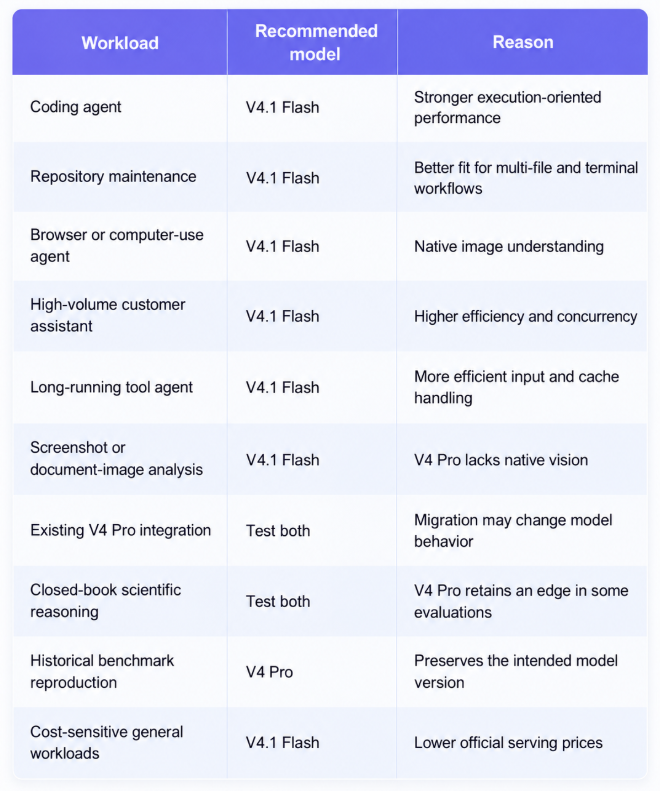
Accessing DeepSeek Models Through ApiSmart
ApiSmart lets developers access supported AI models through the same OpenAI-compatible API.In many cases, the application can keep the same request structure and change only the model ID.
ApiSmart’s standard endpoint is:
https://gw.apismart.ai/v1
Before using either DeepSeek model:
- Create an ApiSmart account.
- Generate an API key.
- Open the current model list.
- Find the desired DeepSeek route.
- Copy the exact model ID shown in the dashboard.
- Review its current pricing, context and output limits.
ApiSmart’s public model pages currently list DeepSeek V4 Flash and DeepSeek V4 Pro routes. Because aliases and backend versions can change, confirm which backend each route resolves to before running a comparison.
Python Request Example
import os
from openai import OpenAI

client = OpenAI(
    api_key=os.environ["APISMART_API_KEY"],
    base_url="https://gw.apismart.ai/v1",
)

response = client.chat.completions.create(
    model="YOUR_DEEPSEEK_MODEL_ID",
    messages=[
        {
            "role": "system",
            "content": (
                "You are a senior software engineer. "
                "Identify the root cause before proposing the smallest safe fix."
            ),
        },
        {
            "role": "user",
            "content": (
                "Review this service migration plan and identify "
                "the three highest-risk assumptions."
            ),
        },
    ],
)

print(response.choices[0].message.content)
Replace YOUR_DEEPSEEK_MODEL_ID with the exact identifier displayed in the ApiSmart dashboard.
cURL Request Example
curl "https://gw.apismart.ai/v1/chat/completions" \

  -H "Authorization: Bearer $APISMART_API_KEY" \

  -H "Content-Type: application/json" \

  -d '{

    "model": "YOUR_DEEPSEEK_MODEL_ID",

    "messages": [

      {

        "role": "user",

        "content": "Analyze this deployment plan and return the risks as structured JSON."

      }

    ]

  }'
Keeping the model ID in an environment variable or configuration service makes it easier to compare routes or roll back after migration.
Why Use ApiSmart for Model Evaluation?
Sending a request is easy. Maintaining separate accounts, authentication, billing, and integration code for every provider is the harder part.
ApiSmart brings model access, authentication, usage tracking, routing, and failover into one platform.
This is especially useful when V4.1 Flash and V4 Pro are only two candidates in a larger routing strategy.
A team may use V4.1 Flash for coding, vision and high-volume agents, while routing selected reasoning tasks to V4 Pro or another model.That lets the application switch models without tying each feature to a different provider integration.
Final Verdict
DeepSeek V4.1 Flash is no longer just the cheaper fallback to V4 Pro.Its more efficient architecture, smaller KV cache, native vision, and strong execution results make it a sensible default for many new applications.
V4 Pro still makes sense when you need its established behavior, historical reproducibility, or stronger results on specific closed-book reasoning tasks. Its role is narrower, but it should not be removed from a production system solely because a newer model leads more public benchmarks.
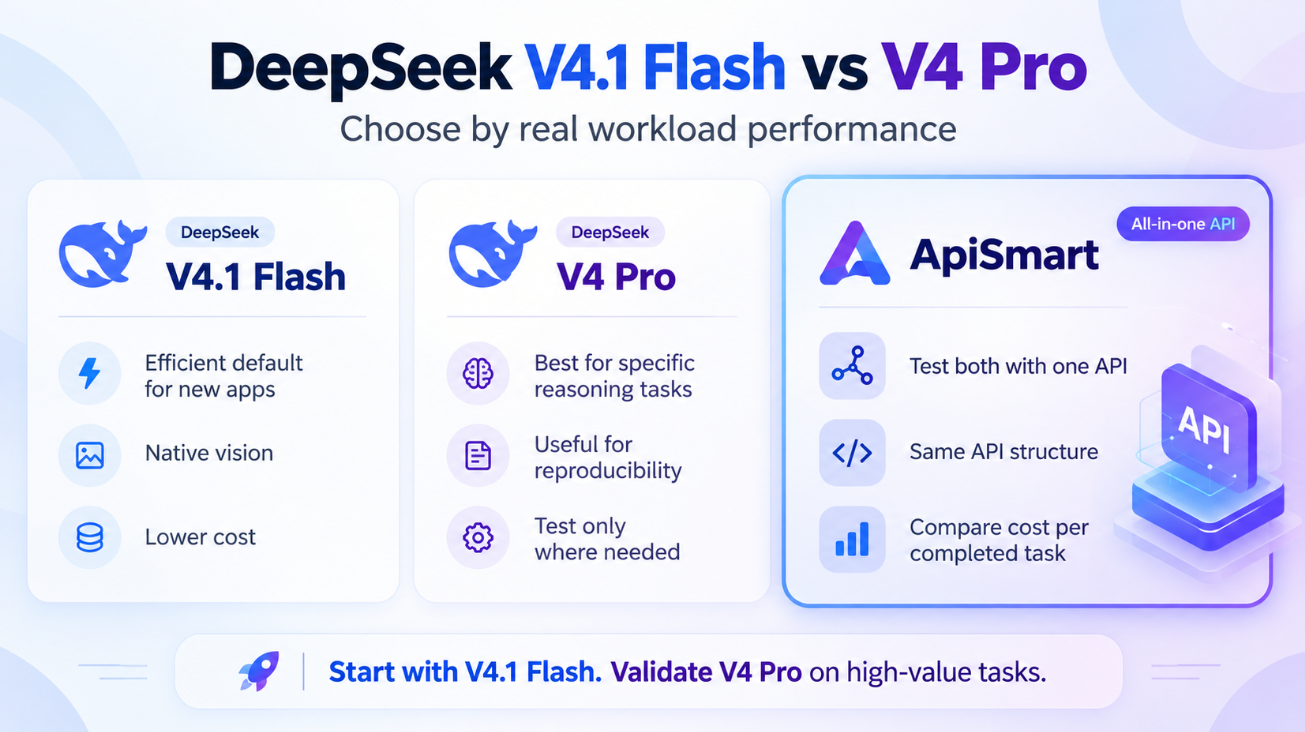
For a new deployment, start with V4.1 Flash and test V4 Pro only on the tasks where its reasoning advantage may be worth the extra cost.
If you already use V4 Pro, run both models on real production tasks, compare cost per completed task, and migrate gradually.
Through ApiSmart, teams can test both models with the same API structure and choose based on real workload performance rather than the Flash or Pro label.
Frequently Asked Questions
Is DeepSeek V4.1 Flash better than V4 Pro?
V4.1 Flash performs better in many published coding, terminal, automation, agent and tool-use evaluations. V4 Pro remains stronger in selected pure-reasoning tests, so the correct choice depends on the workload.
Does DeepSeek V4.1 Flash support images?
Yes. V4.1 Flash includes native visual understanding. The current V4 Pro API documentation does not list native vision support.
Do both models support long context?
Yes. DeepSeek currently documents a one-million-token context window for both routes. Actual limits exposed by another API platform should be confirmed in its current model catalog.
Is V4.1 Flash cheaper than V4 Pro?
DeepSeek’s official API schedule lists lower cache-hit input, cache-miss input and output rates for V4.1 Flash. ApiSmart pricing may differ, so check the live model list before calculating production costs.
Should I replace V4 Pro immediately?
Not without testing. Run representative prompts, structured outputs and tool workflows through both models. A compatible API format does not guarantee identical behavior.
Which model is better for coding agents?
V4.1 Flash is generally the better candidate because it performs strongly on repository, terminal and automation evaluations while offering higher serving efficiency.
Can I use both models through ApiSmart?
ApiSmart lists DeepSeek model routes through its unified platform. Check the current dashboard for availability, exact model identifiers, backend versions, pricing and supported parameters.