


Should You Use DeepSeek V4 Pro? A Production Evaluation Guide
 2026-10-07
 1319 Reads
A model with 1.6 trillion parameters and a one-million-token context window is easy to admire. Deciding whether it improves a production system is harder.
DeepSeek V4 Pro has substantially more active capacity than DeepSeek V4 Flash. That additional capacity can improve complex coding, technical reasoning and long-running agent workflows. It can also increase latency, context costs and infrastructure requirements when assigned to tasks that a smaller model could already complete.
The useful question is therefore not:
Is DeepSeek V4 Pro powerful?
The more useful question is:
Which requests produce enough additional value to justify routing them to DeepSeek V4 Pro?
For most applications, V4 Pro makes more sense as an escalation model than as the default for every request.
Routine work can go to a faster model first, with V4 Pro reserved for difficult tasks, failed attempts, or cases where mistakes carry more risk .
The Decision in 30 Seconds
Use DeepSeek V4 Pro when the request involves:
- A large or unfamiliar repository
- Several dependent reasoning steps
- Cross-file debugging
- Long technical documents
- Complex constraints
- Extended tool-based execution
- High failure costs
- A need for deeper planning
Use a lighter model when the request involves:
- Classification
- Simple extraction
- Short summarization
- Basic question answering
- Routine rewriting
- Straightforward code completion
- High-volume, low-risk traffic
- Strict latency requirements
This distinction matters because DeepSeek V4 Pro contains 1.6T total parameters and activates 49B per token, while V4 Flash contains 284B total parameters and activates 13B. Both support a one-million-token context window.
DeepSeek V4 Pro as a Production Component
DeepSeek V4 Pro works best as one part of a larger system rather than as the entire AI stack .
That system may also contain:
- A request classifier
- A retrieval layer
- A cheaper default model
- Tool definitions
- Code execution
- Output validators
- Retry rules
- Fallback models
- Human review
- Usage monitoring
The model itself does not decide whether a patch is safe, whether a calculation is correct or whether a customer-facing answer meets policy. Those decisions belong to the surrounding application.
So the useful test is not whether V4 Pro gives an impressive answer, but whether it helps the full workflow reach a correct, verified result more often.
A Production-Focused Specification Snapshot
|
Decision factor |
DeepSeek V4 Pro |
|
Current ApiSmart route |
DeepSeek-V4-Pro-0813 |
|
Architecture |
Sparse Mixture of Experts |
|
Total parameters |
1.6T |
|
Active parameters |
49B per token |
|
Context window |
1,024K on the current ApiSmart listing |
|
Maximum output on ApiSmart |
256K |
|
Native input |
Text |
|
Reasoning options |
Non-think, Think High and Think Max |
|
Open weights |
Yes |
|
License |
MIT |
|
Recommended role |
High-capability or escalation tier |
DeepSeek’s model card confirms the 1.6T/49B architecture and million-token context. ApiSmart’s current listing specifies a 1,024K context window and 256K maximum output for DeepSeek-V4-Pro-0813.
Do not mix limits from different deployments. If you are using ApiSmart, use the limits shown for the current ApiSmart route.
Five Workloads That Can Justify V4 Pro
1. Repository-wide debugging
Many coding models perform well when the necessary information appears in one file. Production bugs are rarely so cooperative.
A repository-level issue may involve:
- Authentication middleware
- Configuration
- Database state
- Caching
- Type definitions
- Tests
- Deployment settings
- A recent dependency change
V4 Pro is worth testing when the agent needs to trace behavior across several components before making a change .
A good repository test should require the model to:
- Inspect the project.
- Locate the failing path.
- Explain the root cause.
- Propose the smallest safe change.
- Run targeted tests.
- Run the broader suite.
- Report remaining uncertainty.
The model should not receive credit merely for producing a plausible patch.
2. Requirements-to-implementation work
Some development tasks begin with a long specification rather than a clearly defined bug.
The model may need to connect:
- Product requirements
- Existing architecture
- Data contracts
- Security rules
- Compatibility constraints
- Testing requirements
- Release documentation
V4 Pro is more valuable when success depends on preserving all of these constraints throughout planning and implementation.
3. Long-horizon agents
An agent that performs one tool call is relatively easy to evaluate. An agent that executes for an hour can fail in many more ways.
Long-horizon failure modes include:
- Forgetting the original objective
- Repeating failed commands
- Editing unrelated files
- Ignoring an acceptance condition
- Continuing after completion
- Accumulating contradictory assumptions
- Expanding the scope unnecessarily
Test V4 Pro on workflows where these failures can actually happen. The real question is whether it can keep a coherent plan across many actions, not whether it simply writes better text.
4. Large-document synthesis
A one-million-token context can accommodate extensive document collections, but capacity alone is not enough.
The model must still:
- Identify relevant sections
- Separate facts from interpretation
- Resolve conflicts
- Preserve dates and entities
- Cite supporting evidence
- Avoid inventing missing information
V4 Pro is worth testing for technical due diligence, policy comparison, research synthesis, and large document reviews, especially when retrieval and citation checks are already part of the workflow.
5. High-cost decisions
A stronger model may be economical when a mistake would create substantial downstream work.
Examples include:
- A migration plan affecting several services
- A security-sensitive code change
- A database schema update
- A complex financial calculation
- An enterprise architecture decision
- A release-blocking defect
The important metric is not the price of one request. It is the total cost of reaching an accepted result.
Three Workloads That Usually Do Not Need V4 Pro
Classification and routing
Intent classification, language detection and simple ticket routing normally require limited reasoning. A smaller model can often complete these tasks faster and at lower cost.
Predictable extraction
If the input format is stable and the output schema is narrow, additional model capacity may not produce meaningful value.
Use schema validation and retry logic instead of assigning every extraction request to the largest model.
Short, low-risk generation
Product descriptions, basic rewriting and routine summaries are unlikely to benefit enough from V4 Pro to justify making it the default.
The exception is when these tasks include difficult compliance or factual requirements.
Why One Million Tokens Is Not a Prompting Target
A large context window is a capacity limit, not a recommendation to fill every request.
Sending an entire repository or document archive can introduce:
- Higher input cost
- Longer time to first token
- More irrelevant information
- Conflicting versions
- Lower attention on the critical evidence
- Harder-to-reproduce evaluations
The better question is:
What is the smallest context that gives the model enough evidence to complete the task?
A well-designed long-context pipeline can use:
- Metadata filtering
- Retrieval
- Repository maps
- Dependency analysis
- Context ranking
- Deduplication
- V4 Pro for final reasoning
You can always add more context when the task needs it without making every request huge by default.
How to Evaluate V4 Pro Properly
Public benchmarks can identify candidates, but they cannot determine whether V4 Pro is suitable for a specific product.
DeepSeek reports strong V4-Pro-Max results, including 93.5% on LiveCodeBench and 80.6% resolved on SWE-bench Verified under its evaluation settings. The model card also shows that results vary across reasoning modes and benchmarks.
Test it on tasks taken from your actual application .
Step 1: Define an acceptance test
Every task needs a measurable result.
|
Workload |
Acceptance condition |
|
Repository repair |
Full test suite passes |
|
Data extraction |
Output passes schema and field validation |
|
Research synthesis |
Every factual claim maps to supplied evidence |
|
Tool agent |
Objective completed within tool and retry limits |
|
Security review |
Findings confirmed by tools or qualified reviewers |
|
Planning |
Plan satisfies all documented constraints |
Without an acceptance test, evaluators tend to reward confident writing rather than correct work.
Step 2: Use representative tasks
Create a set of tasks drawn from real application traffic.
Include:
- Ordinary tasks
- Difficult tasks
- Ambiguous tasks
- Requests with missing information
- Tasks that should be refused or escalated
- Cases that caused previous failures
A dataset containing only showcase prompts will overestimate production quality.
Step 3: Keep the environment fixed
Each candidate model should receive the same:
- Repository snapshot
- System instructions
- Tools
- Network access
- Timeout
- Retry limit
- Acceptance test
- Output format
Model-specific reasoning controls should be documented for every run.
Step 4: Measure workflow results
Record:
- Pass or fail
- Input tokens
- Output tokens
- Reasoning tokens
- Tool-call count
- Invalid tool calls
- Retries
- Total latency
- Human correction time
- Final cost
That tells you which model actually completes the work, not which one writes the most convincing answer.
Cost per Accepted Task
Token pricing is only one component of cost.
Use this formula:
Cost per accepted task = model usage + tool calls + retries + fallback calls + human review
Consider two models:
|
Metric |
Model A |
Model B |
|
Cost per attempt |
$0.08 |
$0.22 |
|
Acceptance rate |
40% |
85% |
|
Average retries |
1.8 |
0.3 |
|
Human review |
12 minutes |
3 minutes |
Model A appears cheaper when evaluated per request. Model B may be significantly cheaper when evaluated per accepted task.
V4 Pro is economically justified when its higher success rate reduces retries, engineering time or operational risk enough to offset the additional inference cost.
Use Reasoning Effort as a Routing Variable
DeepSeek V4 Pro supports Non-think, Think High and Think Max modes.
These modes can be treated as separate production tiers.
Non-think
Suitable for:
- Routine transformations
- Short explanations
- Basic coding questions
- Low-risk decisions
Think High
Suitable for:
- Debugging
- Multi-step planning
- Technical analysis
- Repository questions
- Tool selection
Think Max
Suitable for:
- Exceptionally difficult tasks
- Evaluation suites
- Complex mathematics
- High-risk engineering
- Tasks that failed at lower effort
Using Think Max for every request can increase latency and token consumption without improving simple work.
A Better Routing Architecture
A strong deployment can separate request handling into four stages.
Stage 1: Classify the task
Determine:
- Task category
- Estimated complexity
- Risk level
- Required modality
- Context size
- Tool requirements
Because V4 Pro is text-only, image-dependent requests should be routed to a multimodal model or a vision preprocessing step.
Stage 2: Select the initial model
Route ordinary text tasks to a lighter model.
Possible V4 Flash workloads include:
- Extraction
- Classification
- Summarization
- Straightforward coding
- Initial repository inspection
Stage 3: Validate the result
Validation can include:
- JSON Schema checks
- Unit tests
- Static analysis
- Citation verification
- Confidence rules
- Business constraints
Stage 4: Escalate when needed
Invoke V4 Pro when:
- Tests fail.
- The validator rejects the output.
- The task exceeds a complexity threshold.
- Several components must be analyzed together.
- The request carries elevated risk.
- The lighter model reports insufficient evidence.
That avoids paying the V4 Pro cost for tasks a lighter model can already handle .
DeepSeek V4 Pro vs V4 Flash: Operational Roles
|
Production role |
V4 Flash |
V4 Pro |
|
Default traffic |
Strong fit |
Often unnecessary |
|
High-volume automation |
Preferred |
Use selectively |
|
Complex debugging |
Initial attempt |
Escalation tier |
|
Difficult planning |
Limited cases |
Preferred |
|
Repository-wide change |
Screening or search |
Final reasoning |
|
Simple extraction |
Preferred |
Excess capacity |
|
High-risk task |
Preliminary work |
Strong candidate |
|
One-million-token support |
Yes |
Yes |
|
Active parameters |
13B |
49B |
The difference is not that V4 Flash is “weak” and V4 Pro is “strong.” Their most useful production roles are different.
Flash can handle broad traffic efficiently. Pro can focus on the smaller portion of requests where deeper reasoning changes the outcome.
Text-Only Means Text-Only
DeepSeek V4 Pro does not natively inspect images through its standard model interface.
If a task contains:
- Screenshots
- Scanned documents
- Diagrams
- Charts
- Video frames
- Visual layouts
the application should either select a multimodal model or create a pipeline such as:
- Multimodal model extracts visual evidence.
- Evidence is converted into structured text.
- V4 Pro performs deeper reasoning.
- The result is validated against the original material.
Using a separate visual model does not make V4 Pro multimodal. It creates a multimodel workflow.
API Access Through ApiSmart
ApiSmart currently lists DeepSeek-V4-Pro-0813 with a 1,024K context window and 256K maximum output.
The OpenAI-compatible base URL is:
https://gw.apismart.ai/v1
Before deployment, confirm the current:
- Model ID
- Input and output prices
- Context limit
- Maximum output
- Supported parameters
- Rate limits
- Availability
Python Integration
import os
from openai import OpenAI

client = OpenAI(
    api_key=os.environ["APISMART_API_KEY"],
    base_url="https://gw.apismart.ai/v1",
)

response = client.chat.completions.create(
    model="DeepSeek-V4-Pro-0813",
    messages=[
        {
            "role": "system",
            "content": (
                "You are reviewing a production software change. "
                "Identify the root cause, propose the smallest safe patch, "
                "and list the tests required to validate it."
            ),
        },
        {
            "role": "user",
            "content": (
                "A refresh token remains valid after the user changes "
                "their password. Analyze the likely control flow and "
                "propose a remediation plan."
            ),
        },
    ],
)

print(response.choices[0].message.content)
cURL Integration
curl "https://gw.apismart.ai/v1/chat/completions" \
  -H "Authorization: Bearer $APISMART_API_KEY" \
  -H "Content-Type: application/json" \
  -d '{
    "model": "DeepSeek-V4-Pro-0813",
    "messages": [
      {
        "role": "system",
        "content": "Review production changes conservatively. Explain the root cause, propose a minimal patch, and define validation tests."
      },
      {
        "role": "user",
        "content": "A refresh token remains valid after the user changes their password. Analyze the likely control flow and propose a remediation plan."
      }
    ]
  }'
The model ID should be copied from the current ApiSmart catalog. Do not assume that a provider alias and an ApiSmart routing ID are always identical.
Output Limits and Context Budgets
Do not configure the maximum available output for every request.
Reserve context for both input and output:
total context budget
= system instructions
+ conversation
+ retrieved evidence
+ tool results
+ expected output
If the ApiSmart route supports a 1,024K context window and up to 256K output, using the full input capacity would leave insufficient space for a maximum-length response.
Set task-specific output limits:
|
Task |
Typical output requirement |
|
Classification |
Tens of tokens |
|
Extraction |
Hundreds of tokens |
|
Code review |
Hundreds to thousands |
|
Patch generation |
Depends on changed files |
|
Research report |
Thousands |
|
Repository plan |
Thousands |
Long output limits increase the risk of unnecessary generation and unpredictable cost.
Observability Requirements
A V4 Pro deployment should track more than request count.
Monitor:
- Model ID and version
- Routing reason
- Reasoning mode
- Input tokens
- Output tokens
- Cache usage
- First-token latency
- Total latency
- Tool calls
- Retry count
- Validator outcome
- Fallback usage
- Cost per accepted task
These fields help answer whether V4 Pro is actually improving the system.
For example, if V4 Pro receives 30% of traffic but only improves acceptance on 2% of those requests, the routing threshold may be too low.
When Self-Hosting Becomes Relevant
DeepSeek V4 Pro’s weights are published under the MIT License.
Self-hosting may be worth investigating when:
- Traffic is large and predictable.
- Data-location requirements prohibit hosted inference.
- The organization already operates distributed GPU infrastructure.
- Custom inference behavior is necessary.
- Model modification or quantization is part of the plan.
API access is generally more practical when:
- Traffic changes significantly.
- The product is still being validated.
- The team lacks inference specialists.
- Fast deployment is important.
- Operational simplicity matters.
The 1.6T checkpoint makes self-hosting a substantial infrastructure project. Open weights provide freedom, not free operations.
Why ApiSmart Fits a Routing Strategy
A routing system becomes harder to maintain when every model requires separate:
- Credentials
- SDKs
- Billing accounts
- Error formats
- Usage dashboards
- Retry behavior
- Provider-specific code
ApiSmart lets supported models use the same OpenAI-compatible API structure, so teams can switch models without rebuilding the integration for every provider .
ApiSmart also reports:
- Access to 200+ models
- Global edge acceleration
- Millisecond-level failover
- Zero request-content retention
- Centralized usage logs
- A 99.99% availability SLA
That makes it easier to use V4 Pro only where it adds value instead of sending every request to it.
Production Checklist
Before enabling DeepSeek V4 Pro, confirm that:
- The task has a measurable acceptance condition.
- The current ApiSmart model ID is verified.
- API credentials are stored server-side.
- Input and output budgets are defined.
- Large context is filtered or retrieved deliberately.
- Reasoning effort matches task difficulty.
- Tool calls are schema-validated.
- Retries have strict limits.
- A fallback route has been tested.
- Text-only limitations are understood.
- Usage, latency and cost are monitored.
- High-risk outputs receive independent verification.
Final Recommendation
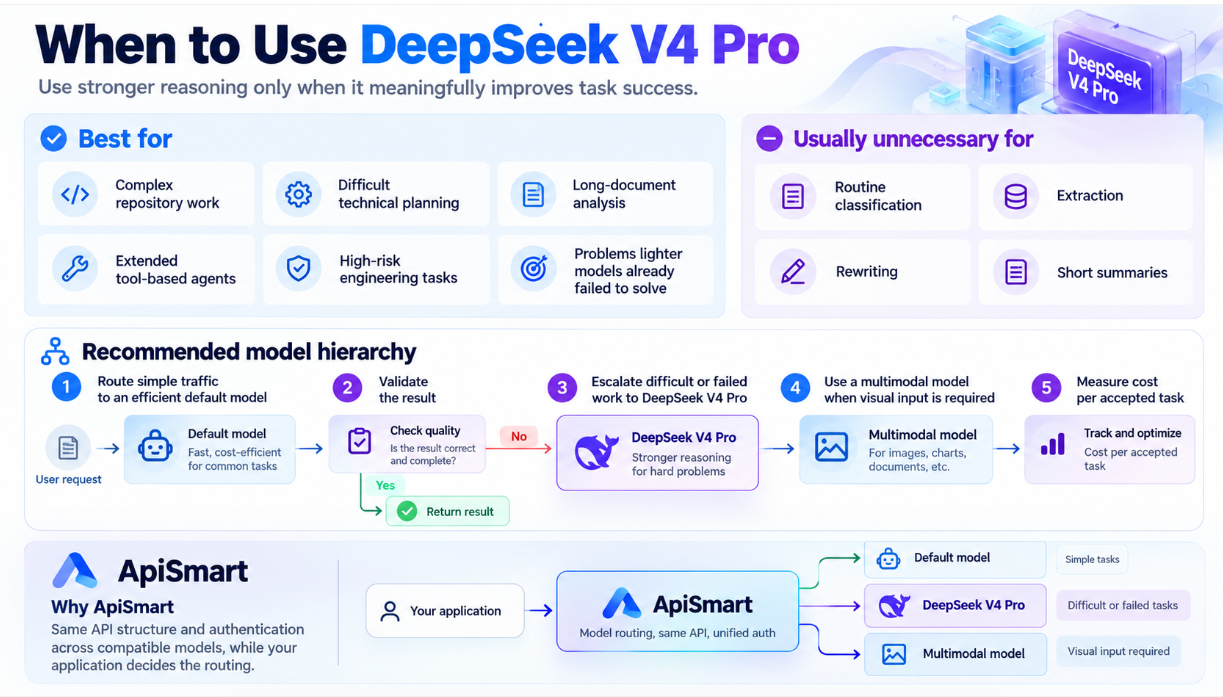
Use DeepSeek V4 Pro when the extra reasoning capacity meaningfully improves the chance of getting the task right .
That includes complex repository work, difficult technical planning, long-document analysis, extended tool-based agents, high-risk engineering tasks, and problems that lighter models have already failed to solve
It is usually unnecessary for routine classification, extraction, rewriting and short summaries.
In practice, a simple model hierarchy often works better:
- Route simple traffic to an efficient default model.
- Validate the result.
- Escalate difficult or failed work to DeepSeek V4 Pro.
- Use a multimodal model when visual input is required.
- Measure cost per accepted task.
ApiSmart supports this setup by letting compatible models use the same API structure and authentication while the application decides which model handles each task.
Frequently Asked Questions
Should DeepSeek V4 Pro be the default model?
Usually not. It is better suited to complex or high-risk requests. Routine tasks can often be handled more efficiently by V4 Flash or another lighter model.
What is the best use case for DeepSeek V4 Pro?
Repository-scale coding, difficult reasoning, long-document analysis and extended tool-based agents are among its strongest use cases.
Does a one-million-token context remove the need for RAG?
No. Retrieval can still reduce cost, latency and irrelevant context while making results easier to reproduce.
How should V4 Pro be evaluated?
Use real tasks with objective acceptance tests. Measure success rate, retries, latency, tool reliability, human correction and total cost.
Is DeepSeek V4 Pro multimodal?
No. Treat it as a text model. Use a separate multimodal model for images, charts, screenshots or video.
What model ID should I use with ApiSmart?
ApiSmart currently lists DeepSeek-V4-Pro-0813. Confirm the latest identifier in the ApiSmart catalog before deployment.
What is the current ApiSmart output limit?
The current ApiSmart listing shows a 256K maximum output for DeepSeek-V4-Pro-0813. The limit should be rechecked before production use.
Can DeepSeek V4 Pro be self-hosted?
Its weights are available under the MIT License, but operating a 1.6T-parameter MoE model requires substantial infrastructure and engineering expertise.
How can I control costs?
Use smaller models for routine requests, retrieve only relevant context, set appropriate output limits, validate responses and escalate to V4 Pro only when necessary.