


How to Use MiniMax-M2.5 API: Coding, AI Agents & Productivity Guide
 2026-10-23
 1268 Reads
MiniMax-M2.5 is built for workloads where generating a good answer is only part of the job. Coding agents, research assistants, office automation systems, and tool-driven applications need a model that can break a problem into steps, interact with external tools, maintain progress across a longer task, and produce useful artifacts at the end.
For developers, M2.5 is mainly useful for coding assistants, autonomous agents, research, document creation, data analysis, and other tasks that require more than a simple chat response.
This guide looks at MiniMax-M2.5’s main features, benchmarks, use cases, prompting tips, and how to access it through ApiSmart.
What Is MiniMax-M2.5?
MiniMax-M2.5 is a reasoning-focused large language model from MiniMax designed around real-world productivity and agentic workloads.
MiniMax describes M2.5 as being extensively trained with reinforcement learning across hundreds of thousands of complex real-world environments. The company specifically emphasizes four areas:
- Coding
- Agentic tool use
- Search
- Office and productivity tasks
It is also designed to break complex tasks into smaller steps and work through them efficiently.
This changes the model's role from:
User Question
↓
Generate Answer
toward:
User Goal
↓
Understand Task
↓
Create Plan
↓
Use Tools
↓
Inspect Results
↓
Continue Working
↓
Produce Final Result
That kind of workflow is what makes the model useful for AI agents.
What Makes MiniMax-M2.5 Different?
MiniMax-M2.5 is not mainly aimed at improving ordinary chatbot conversations.
Its main improvements are aimed at tasks that require several steps, tools, or decisions.
A typical agentic workflow may require the model to:
- Understand a complex objective.
- Break it into smaller tasks.
- Determine which tools are required.
- Call those tools with the correct parameters.
- Analyze the returned information.
- Revise the plan when necessary.
- Continue until the objective is complete.
M2.5 demonstrates more mature decision-making on agentic tasks, including more precise search iterations and improved token efficiency.
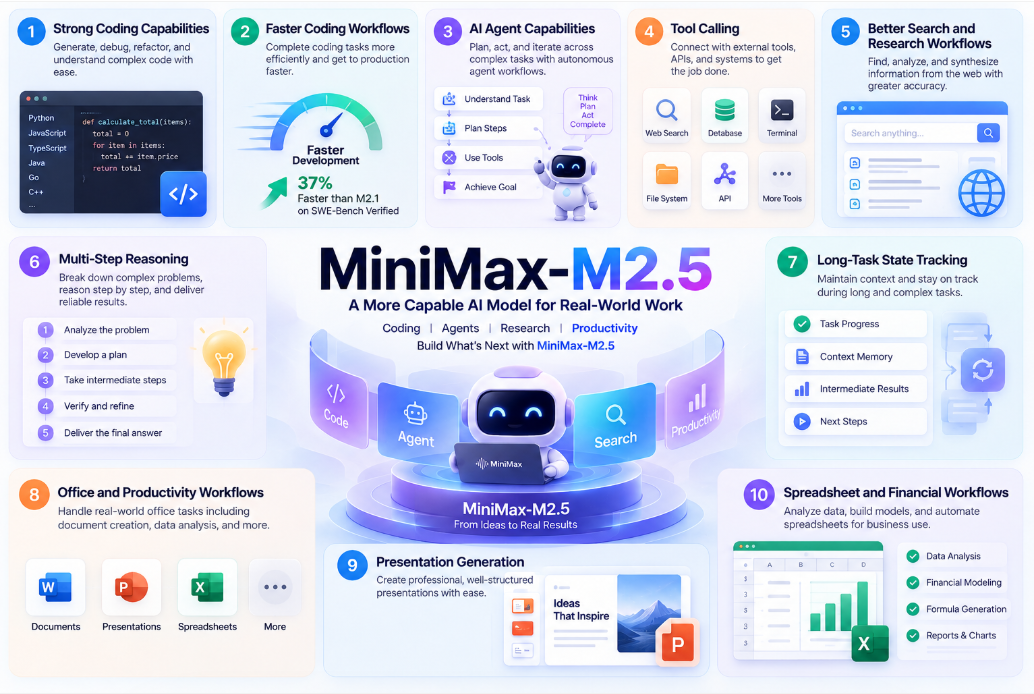
1. Strong Coding Capabilities
Coding is one of MiniMax-M2.5's primary strengths.
M2.5 is designed for larger software-engineering tasks, not just generating isolated code snippets. It can work across files, dependencies, tests, debugging steps, and tool calls.
Potential tasks include:
- Code generation
- Bug fixing
- Code refactoring
- Unit-test generation
- Repository analysis
- Feature implementation
- Frontend development
- Backend development
- API integration
- Code review
- Build troubleshooting
- Developer automation
MiniMax reports an 80.2% score on SWE-Bench Verified, a benchmark focused on solving real-world software-engineering issues from GitHub repositories.
It also reports 51.3% on Multi-SWE-Bench, which evaluates software-engineering capabilities across multiple programming languages.
These benchmark results suggest that coding is one of M2.5’s strongest use cases.
2. Faster Coding Workflows
For coding agents, accuracy is not the only thing that matters.
A model can solve a problem correctly but still be impractical if a long agent loop takes too much time.
MiniMax says M2.5 completed its SWE-Bench Verified evaluation 37% faster than M2.1, reflecting improvements in task decomposition and reasoning efficiency.
For an autonomous coding workflow, this matters because one request can trigger many steps:
Read Issue
↓
Inspect Repository
↓
Search Relevant Files
↓
Understand Existing Code
↓
Create Patch
↓
Run Tests
↓
Analyze Failure
↓
Modify Patch
↓
Run Tests Again
Saving a little time at each step can make a noticeable difference over a long agent run.
3. AI Agent Capabilities
MiniMax explicitly positions M2.5 around the Agent Universe.
AI agents differ from ordinary chatbots because they do not simply respond to messages.
They can operate through a loop:
That makes M2.5 useful for coding agents, research agents, browser automation, data analysis, DevOps, and office workflows.
The model's ability to decompose tasks becomes especially valuable when one objective requires many dependent actions.
4. Tool Calling
Tool calling lets the model interact with external systems instead of relying only on what it already knows.
An agent might connect to search, databases, terminals, browsers, code execution, file systems, internal APIs, CRMs, or calendars.
A request such as:
“Analyze this repository, identify why the tests are failing, fix the issue, and verify the patch.”
could then become:
Inspect Repository
↓
Read Source Files
↓
Run Tests
↓
Analyze Error
↓
Edit Code
↓
Run Tests Again
↓
Return Result
MiniMax identifies agentic tool use as one of M2.5's core strengths, and its API documentation supports generating conversational content and triggering tool calls from provided context.
5. Better Search and Research Workflows
Search matters when the model needs information that is not already in the conversation or supplied context .
For example, a developer agent might need to:
Search Latest Documentation
↓
Read API Reference
↓
Compare Version Changes
↓
Modify Existing Code
↓
Test Integration
MiniMax reports a 76.3% BrowseComp score with context management for M2.5. BrowseComp is designed to test models on difficult information-finding tasks.
That makes M2.5 useful for research tasks that require both searching and reasoning.
6. Multi-Step Reasoning
Complex tasks rarely have a single-step solution.
For example, improving a web application may involve reviewing the frontend and backend, finding bottlenecks, implementing changes, running tests, and measuring the results.
M2.5 was trained to decompose tasks efficiently and improve thinking-token efficiency when handling complicated tasks.
7. Long-Task State Tracking
Long-running agents must remember what they are trying to accomplish.
A coding agent may perform dozens of actions before finishing a task.
If the agent loses track of the original goal, files it has already inspected, previous tool results, failed approaches, or remaining tasks, the workflow quickly becomes inefficient.
MiniMax-M2.5 is designed to manage complex agentic tasks with more focused objectives and efficient context management, helping maintain direction across longer workflows.
Applications can also help by explicitly tracking the current plan, completed tasks, state, and next action.
8. Office and Productivity Workflows
MiniMax-M2.5 is not limited to programming.
MiniMax specifically highlights improvements in advanced workplace scenarios involving:
- Word documents
- PowerPoint presentations
- Excel workflows
- Financial modeling
This also makes M2.5 useful outside software development.
For example:
Research Topic
↓
Collect Information
↓
Analyze Data
↓
Build Spreadsheet
↓
Create Charts
↓
Generate Presentation
↓
Write Executive Summary
Instead of using separate models for each reasoning step, an M2.5-based agent can potentially coordinate the broader workflow.
9. Presentation Generation
MiniMax showcases M2.5 creating professional presentation content, including a strategy-consulting presentation for a beverage brand covering market development, competition, target consumers, and distribution strategy.
There is a big difference between asking a model to write a few slides and asking it to research, analyze, organize, and build a full presentation.
10. Spreadsheet and Financial Workflows
Spreadsheet tasks can require both quantitative reasoning and tool interaction.
Possible uses include financial modeling, budgeting, forecasting, data cleaning, formula generation, spreadsheet automation, and business reporting.
MiniMax explicitly lists Excel financial modeling among M2.5's improved advanced workspace scenarios.
For an AI agent, a financial-modeling workflow might look like:
Raw Data
↓
Clean Data
↓
Understand Business Assumptions
↓
Build Model
↓
Create Formulas
↓
Validate Calculations
↓
Generate Charts
↓
Summarize Findings
MiniMax-M2.5 Use Cases
AI Coding Assistants
Coding assistants are one of the most obvious use cases for M2.5.
A coding assistant can help with feature development, debugging, refactoring, testing, repository navigation, documentation, and code review.
More advanced systems can combine M2.5 with terminal and repository tools to create autonomous coding agents.
Autonomous Coding Agents
An autonomous agent can go further:
GitHub Issue
↓
Analyze Requirements
↓
Inspect Repository
↓
Develop Solution
↓
Run Tests
↓
Fix Problems
↓
Generate Final Patch
This is where M2.5’s combination of coding, planning, and tool use becomes especially useful.
Research Agents
A research agent might create a search plan, collect sources, cross-check information, organize the evidence, and then produce a report.
The model's BrowseComp performance is particularly relevant to these workflows.
Office Automation
M2.5 can also power assistants for everyday office work.
Potential workflows include:
- Document generation
- Presentation creation
- Spreadsheet analysis
- Financial modeling
- Business reports
- Meeting preparation
- Research summaries
MiniMax specifically highlights Word, PowerPoint, and Excel financial modeling as advanced workspace use cases.
Data Analysis
Combined with code execution or spreadsheet tools, M2.5 can support:
Dataset
↓
Inspect
↓
Clean
↓
Analyze
↓
Visualize
↓
Interpret
↓
Report
This can be useful for internal analytics, research, finance, operations, and business-intelligence applications.
Workflow Automation
Tool calling allows developers to connect a reasoning model to internal systems.
For example:
Customer Request
↓
MiniMax-M2.5
↓
CRM
↓
Database
↓
Internal API
↓
Generate Response
This lets the model take part in a business process instead of only generating text at the end.
Streaming MiniMax-M2.5 Responses
For interactive applications such as coding assistants and AI agents, ApiSmart's OpenAI-compatible streaming mode can display MiniMax-M2.5 output incrementally as it is generated.
Confirm the current MiniMax-M2.5 model ID and supported parameters in the ApiSmart model catalog or dashboard before deploying to production.
An OpenAI-compatible Python pattern can look like:
import os
from openai import OpenAI

client = OpenAI(
    api_key=os.environ["APISMART_API_KEY"],
    base_url="https://gw.apismart.ai/v1",
)

stream = client.chat.completions.create(
    model="YOUR_MINIMAX_M2_5_MODEL_ID",
    messages=[
        {
            "role": "user",
            "content": "Design a scalable REST API architecture for an e-commerce platform."
        }
    ],
    stream=True,
)

for chunk in stream:
    if chunk.choices[0].delta.content:
        print(chunk.choices[0].delta.content, end="", flush=True)
Check the current ApiSmart documentation for the precise streaming behavior supported by the selected deployment.
Building an AI Agent with MiniMax-M2.5
A production agent usually needs more than a model.
A typical architecture looks like:
User
↓
Application
↓
Agent Orchestrator
↓
MiniMax-M2.5
↓
┌─────────┼─────────┐
↓ ↓ ↓
Search Database Code
↓ ↓ ↓
└──────────┼─────────┘
↓
Tool Results
↓
MiniMax-M2.5
↓
Next Action
↓
Final Result
The model provides reasoning and decision-making, while the application remains responsible for:
- Tool execution
- Permissions
- State management
- Validation
- Error handling
- Security
- Logging
Keeping these responsibilities in the application makes the system easier to control and debug.
How to Prompt MiniMax-M2.5 for Coding
For coding tasks, avoid vague prompts such as:
Build an API.
Instead, specify:
ROLE:
You are a senior Python backend engineer.
TASK:
Build a REST API for user management.
REQUIREMENTS:
- Python 3.11
- FastAPI
- PostgreSQL
- SQLAlchemy
- Pydantic validation
ENDPOINTS:
POST /users
GET /users/{id}
DELETE /users/{id}
QUALITY:
- Type hints
- Error handling
- Unit tests
- Clear project structure
OUTPUT:
1. Architecture
2. File structure
3. Implementation
4. Tests
5. Setup instructions
Structured requirements reduce ambiguity and make the resulting code easier to evaluate.
Break Complex Tasks Into Stages
Even a strong reasoning model benefits from explicit checkpoints.
Instead of asking:
“Build my entire application.”
consider:
Step 1
Analyze requirements
Step 2
Design architecture
Step 3
Define interfaces
Step 4
Implement core logic
Step 5
Write tests
Step 6
Review implementation
Step 7
Fix discovered issues
This approach also makes it easier for your application to validate intermediate outputs before allowing an agent to continue.
Validate Tool Calls
Never assume every generated tool call is correct simply because the model is optimized for agentic tasks.
Before executing sensitive actions, validate:
- Tool name
- Arguments
- Data types
- Permissions
- Resource limits
- Target environment
A robust architecture should look like:
Model Tool Call
↓
Schema Validation
↓
Permission Check
↓
Execute Tool
↓
Validate Result
↓
Return to Model
This is particularly important when tools can modify files, databases, infrastructure, or external systems.
How to Use MiniMax-M2.5 Through ApiSmart
Developers can access supported MiniMax models through ApiSmart’s API.
A typical workflow is:
Create ApiSmart Account
↓
Generate API Key
↓
Select MiniMax-M2.5
↓
Configure API Endpoint
↓
Send Request
↓
Receive Response
Step 1: Create an ApiSmart Account
Create an ApiSmart account and open the developer dashboard.
From the dashboard, you can browse supported models and configure API access.
Step 2: Generate an API Key
Create an API key for your application.
Store it securely as an environment variable:
export APISMART_API_KEY="YOUR_APISMART_API_KEY"
Avoid storing production API keys directly in:
- Source code
- Browser applications
- Mobile applications
- Public GitHub repositories
Backend-side API calls are generally preferable for production applications.
Step 3: Select MiniMax-M2.5
Search the ApiSmart model catalog for MiniMax-M2.5.
Model identifiers can differ between platforms, so use the exact identifier displayed in ApiSmart.
For the examples below, we will use:
YOUR_MINIMAX_M2_5_MODEL_ID
Replace this placeholder with the current ApiSmart model ID before sending requests.
Step 4: Configure the ApiSmart Endpoint
Use the ApiSmart base URL:
https://gw.apismart.ai/v1
For a basic integration, you need:
ApiSmart API Key
+
ApiSmart Endpoint
+
MiniMax-M2.5
↓
Your Application
MiniMax-M2.5 API cURL Example
A basic chat-completion request can follow this structure:
curl "https://gw.apismart.ai/v1/chat/completions" \
  -H "Authorization: Bearer $APISMART_API_KEY" \
  -H "Content-Type: application/json" \
  -d '{
    "model": "YOUR_MINIMAX_M2_5_MODEL_ID",
    "messages": [
      {
        "role": "system",
        "content": "You are an experienced software engineer. Return clear, maintainable code."
      },
      {
        "role": "user",
        "content": "Write a Python FastAPI endpoint for creating users and include input validation and unit tests."
      }
    ],
    "stream": false
  }'
Use the current ApiSmart documentation for supported model-specific parameters and exact model identifiers.
MiniMax-M2.5 API Python Example
Developers using an OpenAI-compatible client can structure an integration like this:
import os
from openai import OpenAI

client = OpenAI(
    api_key=os.environ["APISMART_API_KEY"],
    base_url="https://gw.apismart.ai/v1",
)

response = client.chat.completions.create(
    model="YOUR_MINIMAX_M2_5_MODEL_ID",
    messages=[
        {
            "role": "system",
            "content": (
                "You are a senior software engineer. "
                "Write maintainable code and include tests."
            ),
        },
        {
            "role": "user",
            "content": (
                "Build a Python API client with retries, "
                "timeouts, type hints, and pytest tests."
            ),
        },
    ],
)

print(response.choices[0].message.content)
If your application already uses an OpenAI-style chat API, the integration pattern should feel familiar.
Why Use ApiSmart for MiniMax-M2.5?
Modern AI applications rarely depend on one model forever.
A developer platform might eventually use:
A developer platform might use one model for coding, another for reasoning or search, and separate models for images or video.
Maintaining each provider independently can mean managing separate API keys, endpoints, SDKs, authentication systems, and integration logic.
ApiSmart lets developers access supported MiniMax and other AI models through the same platform.
One API for Multiple AI Models
Developers can then choose a different model when a particular task needs it.
This allows different models to be assigned to the workloads where they perform best.
For example:
MiniMax-M2.5
↓
Coding Agent
Another Model
↓
Image Generation
Another Model
↓
Video Generation
Your application logic can remain centered around a unified API layer.
Flexible Model Selection
No model is automatically best for every workload.
MiniMax-M2.5 is a strong option for applications that need coding, tool use, search, multi-step reasoning, or office automation.
Other models may be preferable for different workloads.
Using one API also makes it easier to test or switch models later.
MiniMax-M2.5 Best Practices
When integrating MiniMax-M2.5 into production applications, several practices can improve reliability:
- Define the objective clearly. Tell the model what successful completion looks like.
- Provide structured context. Separate requirements, constraints, tools, and expected output.
- Break large tasks into checkpoints. Validate important intermediate results.
- Describe tools precisely. Give clear schemas and explain what each tool should be used for.
- Validate tool calls before execution. Especially for operations that modify external systems.
- Use streaming for interactive workflows. MiniMax recommends streaming for M2.5 reasoning workloads.
- Request tests for generated code. Code generation should be followed by automated validation.
- Keep application state explicit. Don't rely entirely on the model to remember every agent action.
- Measure on your own workload. Public benchmarks are useful, but application-specific evaluation matters more.
MiniMax-M2.5 FAQ
What is MiniMax-M2.5?
MiniMax-M2.5 is a reasoning-focused large language model released by MiniMax in February 2026. It is designed primarily for coding, AI agents, tool use, search, and professional productivity workflows.
Is MiniMax-M2.5 good for coding?
Coding is one of M2.5's primary strengths. MiniMax reports 80.2% on SWE-Bench Verified and 51.3% on Multi-SWE-Bench.
Does MiniMax-M2.5 support AI agents?
Yes. MiniMax positions M2.5 specifically around agentic workloads, including task decomposition, search, tool use, coding, and professional productivity.
Does MiniMax-M2.5 support tool calling?
Yes. MiniMax's API documentation describes its M2-series text-generation API as supporting conversational generation and triggering tool calls based on provided context.
Does MiniMax-M2.5 support streaming?
Yes. MiniMax's API supports streaming, and its documentation recommends streaming output for reasoning models such as M2.5.
Can MiniMax-M2.5 handle office tasks?
Yes. MiniMax specifically highlights improvements in advanced workplace scenarios involving Word, PowerPoint, Excel financial modeling, and related productivity tasks.
Is MiniMax-M2.5 open source?
MiniMax states that M2.5's model weights are open sourced and supports local deployment using frameworks such as SGLang and vLLM.
Can I use MiniMax-M2.5 through ApiSmart?
Check ApiSmart's current model catalog for MiniMax-M2.5 availability and use the exact model ID shown there. ApiSmart integrations can use the unified API workflow described above, with the current supported parameters confirmed in ApiSmart's documentation.
Start Building with MiniMax-M2.5 Through ApiSmart
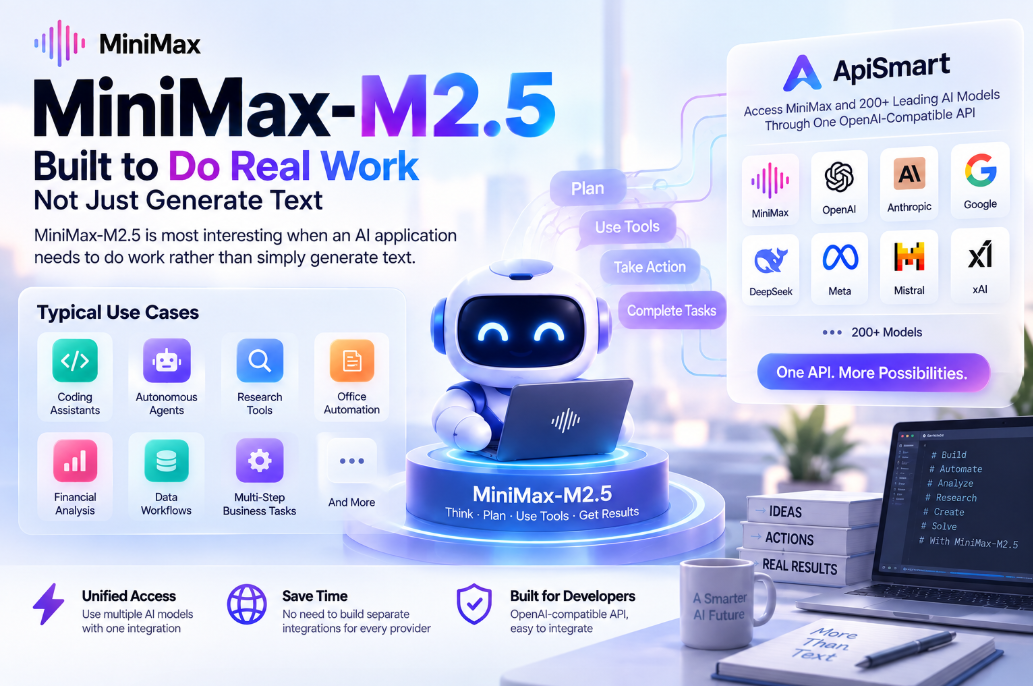
MiniMax-M2.5 is most interesting when an AI application needs to do work rather than simply generate text.
Its strengths in coding, planning, tool use, and search make it a good fit for applications that need to complete several steps before returning a result. MiniMax's published benchmarks and productivity demonstrations reinforce that positioning.
Typical use cases include coding assistants, autonomous agents, research tools, office automation, financial analysis, data workflows, and other multi-step business tasks.
Through ApiSmart, developers can access supported MiniMax models alongside other AI models without building a separate integration for every provider.