


How to Use GLM-5.2 API: Python, cURL, Streaming & OpenAI-Compatible Integration
 2026-10-07
 1239 Reads
How to Use GLM-5.2 API: Python, cURL, Streaming & OpenAI-Compatible Integration
Building with a powerful language model is only useful when developers can integrate it without adding unnecessary infrastructure complexity. For teams working on coding assistants, AI agents, enterprise knowledge systems, or reasoning-heavy applications, API compatibility and model flexibility can matter just as much as raw model capability.
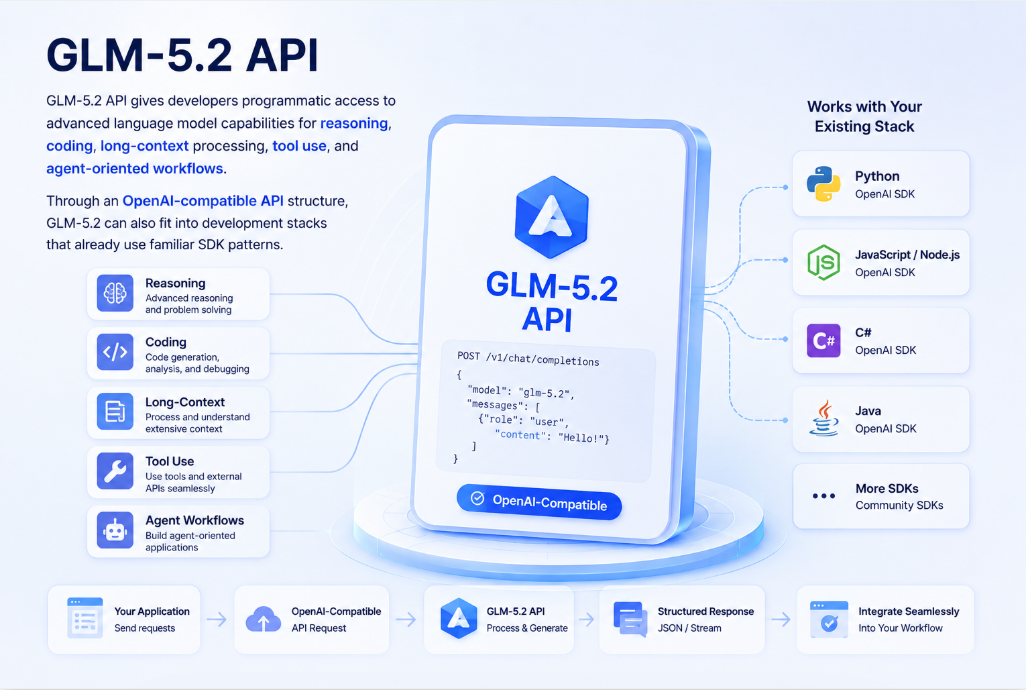
GLM-5.2 API gives developers programmatic access to advanced language model capabilities for reasoning, coding, long-context processing, tool use, and agent-oriented workflows. Through an OpenAI-compatible API structure, GLM-5.2 can also fit into development stacks that already use familiar SDK patterns.
This guide covers what GLM-5.2 API is, its key capabilities, how to integrate it with Python and cURL, common use cases, and how developers can access GLM-5.2 through ApiSmart's unified AI API platform.
What is GLM-5.2 API?
GLM-5.2 is a flagship large language model from Z.AI (Zhipu AI), designed for advanced reasoning, coding, long-context processing, and agent-oriented workflows. Through the GLM-5.2 API, developers can integrate these capabilities directly into applications, SaaS products, developer tools, and automated workflows.
The model supports a context window of up to 1 million tokens, making it suitable for large codebases, extensive documentation, research materials, and complex multi-step AI workflows.
GLM-5.2 can be useful for applications involving:
- Complex reasoning
- Code generation and analysis
- 1M-Token Long-Context Processing
- AI assistants
- Tool calling
- AI agents
- Document understanding
- Knowledge-based applications
- Workflow automation
For developers, the API makes it possible to integrate these capabilities directly into websites, SaaS products, internal tools, developer platforms, and enterprise applications.
Key Features of GLM-5.2 API
Advanced Reasoning
Many production AI applications require more than straightforward question answering.
They need a model that can work through instructions, interpret context, evaluate information, and produce structured responses for complex tasks.
GLM-5.2 can support reasoning-oriented workflows such as:
- Complex question answering
- Multi-step problem solving
- Data interpretation
- Research assistance
- Business analysis
- Decision-support applications
These capabilities make the API useful for applications where prompts involve multiple requirements or large amounts of contextual information.
Long-Context Processing
GLM-5.2 supports a context window of up to 1 million tokens, allowing developers to provide significantly more information within a single AI workflow. This makes it particularly useful for working with:
- Research reports
- Technical documentation
- Large codebases
- Enterprise knowledge
- Legal and business documents
- Long conversations
- Multiple related documents
Instead of treating every small piece of information as an isolated request, developers can provide more relevant context to the model.
However, a larger context window does not mean every request should use the maximum possible context.
Sending unnecessary information increases token consumption, processing time, and API costs. Production applications should combine long-context capabilities with retrieval, context filtering, summarization, and prompt optimization.
Coding Capabilities
Coding remains one of the most valuable use cases for advanced language models.
Developers can use GLM-5.2 API to support tasks such as:
- Code generation
- Code completion
- Debugging
- Code explanation
- Refactoring
- Test generation
- Documentation
- Repository analysis
For example, a developer could send a function to GLM-5.2 and ask the model to identify potential errors, explain the logic, and suggest an optimized implementation.
This makes the model useful for developer tools, coding assistants, automated review systems, and software engineering agents.
Tool Calling
Modern AI applications often need to interact with systems outside the language model itself.
Tool calling allows applications to connect model reasoning with external functions and services.
An application might allow the model to:
- Search a database
- Retrieve account information
- Call another API
- Execute an internal function
- Query a knowledge base
- Trigger a workflow
- Search product information
The application defines the available tools, while the model determines when a tool should be used based on the user's request.
This capability is particularly useful for building AI agents.
AI Agent Workflows
AI agents combine language model reasoning with tools, memory, APIs, and application logic to perform multi-step tasks.
GLM-5.2 API can serve as the reasoning layer for workflows such as:
- Research agents
- Coding agents
- Customer service agents
- Data analysis assistants
- Enterprise workflow automation
- Knowledge assistants
- Developer agents
For example, a research agent could receive a topic, determine what information is required, call relevant tools, analyze the retrieved information, and generate a structured report.
The application controls the tools and workflow while GLM-5.2 provides the language understanding and reasoning capabilities.
How to Access GLM-5.2 API
Developers generally need three components to begin using an AI model through an API:
- An API account
- An API key
- The correct API endpoint and model identifier
ApiSmart provides a unified platform for accessing multiple AI models through a centralized API layer.
Instead of creating separate integrations for different model providers, developers can manage model access through one platform.
How to Use GLM-5.2 API Through ApiSmart
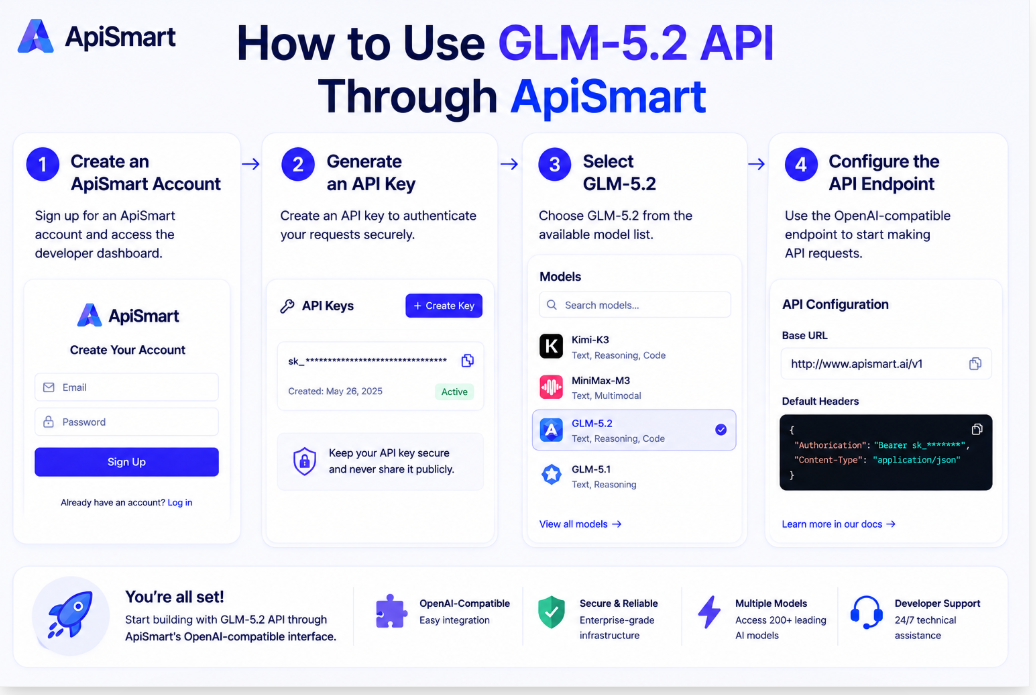
Step 1: Create an ApiSmart Account
Create an ApiSmart account and access the developer dashboard.
From the dashboard, developers can manage their API access and available models.
Step 2: Generate an API Key
Create an API key for your application.
API keys are used to authenticate requests between your application and the ApiSmart API.
A typical authorization header follows this structure:
Authorization: Bearer YOUR_APISMART_API_KEY
API keys should always be stored securely.
Avoid placing production API keys directly inside public source code or client-side applications.
Environment variables or dedicated secret-management systems are safer options.
Step 3: Select GLM-5.2
Find GLM-5.2 in the available model list and check the current model identifier and supported parameters.
Model identifiers can change between platforms, so developers should always use the model ID displayed in the current ApiSmart documentation or dashboard rather than assuming a model name.
Step 4: Configure the API Endpoint
ApiSmart uses an OpenAI-compatible API structure, allowing developers familiar with OpenAI SDKs to reuse existing integration patterns.
In many applications, switching to another compatible model provider only requires updating:
- API key
- Base URL
- Model ID
This significantly reduces integration work when testing or deploying different AI models.
GLM-5.2 API Python Example
Python is one of the most common languages used for AI application development.
An OpenAI-compatible integration typically follows this structure:
from openai import OpenAI
import os

client = OpenAI(
    api_key=os.environ["APISMART_API_KEY"],
    base_url="https://gw.apismart.ai/v1"
)

stream = client.chat.completions.create(
    model="glm-5.2",
    messages=[
        {
            "role": "user",
            "content": "Write a Python function that processes a large JSON file."
        }
    ],
    stream=True
)

for chunk in stream:
    content = chunk.choices[0].delta.content
    if content:
        print(content, end="", flush=True)
Replace the base URL and model ID with the current values provided by ApiSmart.
Using environment variables for API keys also prevents sensitive credentials from being accidentally committed to a public repository.
GLM-5.2 API cURL Example
Developers can test API requests without installing an SDK by using cURL.
A typical OpenAI-compatible request looks like this:
curl YOUR_APISMART_BASE_URL/chat/completions \
  -H "Authorization: Bearer YOUR_APISMART_API_KEY" \
  -H "Content-Type: application/json" \
  -d '{
    "model": "glm-5.2",
    "messages": [
      {
        "role": "user",
        "content": "Explain how AI agents use tool calling."
      }
    ]
  }'
cURL is particularly useful for:
- Testing authentication
- Checking endpoints
- Debugging API requests
- Verifying model availability
- Building quick prototypes
Once the request works correctly, the same API structure can be integrated into the application backend.
Using Streaming with GLM-5.2 API
For applications such as AI chatbots and coding assistants, waiting for the entire response before displaying anything can create unnecessary perceived latency.
Streaming allows applications to receive output incrementally as it is generated.
A typical Python streaming request can follow this pattern:
from openai import OpenAI
import os

client = OpenAI(
    api_key=os.environ["APISMART_API_KEY"],
    base_url="https://gw.apismart.ai/v1"
)

stream = client.chat.completions.create(
    model="glm-5.2",
    messages=[
        {
            "role": "user",
            "content": "Write a Python function that processes a large JSON file."
        }
    ],
    stream=True
)

for chunk in stream:
    if chunk.choices[0].delta.content:
        print(chunk.choices[0].delta.content, end="")
Streaming is especially useful for:
- AI chat applications
- Coding assistants
- Interactive research tools
- Customer support systems
- Long-form generation
It does not necessarily reduce the total generation time, but it can improve the user experience by displaying output earlier.
Building Tool-Calling Applications with GLM-5.2
Tool calling allows a language model to interact with application functions instead of relying entirely on information contained in the prompt.
Consider a weather assistant.
The application could define a function such as:
get_weather(location)
When a user asks
What's the weather in Singapore today?
the model can determine that external information is required and request the appropriate tool.
The application then:
- Receives the tool request
- Executes the weather function
- Returns the result to the model
- Allows the model to generate the final response
The same architecture can be used for:
- Database queries
- E-commerce searches
- CRM operations
- Financial data retrieval
- Enterprise knowledge search
- Internal business systems
Tool calling transforms the language model from a simple response generator into a component capable of participating in real application workflows.
GLM-5.2 API Use Cases
AI Coding Assistants
GLM-5.2 can be integrated into development environments and engineering platforms to provide:
- Code suggestions
- Debugging assistance
- Code explanation
- Refactoring
- Documentation generation
- Automated code review
Developers can also combine coding capabilities with tool calling to create more advanced software engineering agents.
Enterprise Knowledge Assistants
Organizations often have information distributed across documents, databases, wikis, and internal systems.
A GLM-5.2-powered knowledge assistant can help employees:
- Search internal documentation
- Summarize reports
- Compare information
- Answer company-specific questions
- Analyze large documents
Combining the model with retrieval-augmented generation (RAG) can further improve access to organization-specific information.
Research Assistants
GLM-5.2 can support research-heavy workflows involving large amounts of text.
Possible applications include:
- Document analysis
- Report summarization
- Information extraction
- Comparative research
- Structured report generation
When external data is required, developers can combine the model with search or retrieval tools.
Customer Support Automation
Customer service systems can use GLM-5.2 for:
- Answering common questions
- Summarizing conversations
- Classifying support tickets
- Retrieving knowledge-base information
- Drafting responses
- Routing customer requests
Tool calling can also allow the assistant to interact with order systems, account databases, or CRM platforms.
AI Agents
Agent-based systems are one of the most important use cases for advanced language model APIs.
Developers can combine GLM-5.2 with:
- External tools
- APIs
- Memory systems
- Databases
- Search
- Workflow engines
to create applications capable of handling multi-step tasks.
Why Use ApiSmart for GLM-5.2 API?
Integrating one AI model is relatively simple. Managing many providers becomes more difficult as an application grows.
Different providers may use different:
- API endpoints
- Authentication systems
- SDKs
- Model identifiers
- Pricing structures
- Usage dashboards
ApiSmart provides a centralized API layer designed to simplify this process.
Access Multiple AI Models Through One API
ApiSmart allows developers to access multiple leading AI models through one API platform.
Instead of maintaining separate integrations for every provider, developers can work through a unified interface.
This makes it easier to:
- Test different models
- Compare model performance
- Add new models
- Build multi-model applications
- Reduce integration complexity
For teams that regularly evaluate new AI models, this can significantly simplify development.
OpenAI-Compatible Integration
Many AI applications are already built around the OpenAI SDK structure.
ApiSmart's OpenAI-compatible interface allows developers to continue using familiar request patterns and development tools.
For many OpenAI-compatible applications, migrating to ApiSmart requires changing only three configuration values: the API key, base URL, and model ID. This reduces the amount of integration code that needs to be rewritten when testing GLM-5.2 or switching between supported models.
Centralized API Management
Managing multiple model providers separately can add unnecessary complexity as an application grows.
ApiSmart provides a centralized API layer that helps developers manage model access through one integration.
Developers can simplify:
- API access
- Authentication
- Model selection
- Model switching
- Integration management
This allows engineering teams to spend more time building applications and less time maintaining separate provider integrations.
Understanding GLM-5.2 API Costs
API cost is an important factor when moving an AI application from prototype to production.
The cost of using GLM-5.2 through an API depends on the pricing offered by the API provider and the characteristics of each request. Important factors to consider include:
- Input tokens
- Output tokens
- Model selection
- Context size
- Request volume
- Additional model capabilities
Applications processing long documents can consume significantly more input tokens than basic chatbot applications.
Likewise, applications generating long reports or large amounts of code may consume more output tokens.
Developers should therefore consider both model quality and actual workload when estimating costs.
How to Reduce GLM-5.2 API Costs
Avoid Sending Unnecessary Context
Long-context support does not mean every request should contain the full conversation history or entire document collection.
Send only information relevant to the current task.
Use Retrieval for Large Knowledge Bases
Instead of sending an entire knowledge base to the model, retrieval systems can identify relevant information before generating the prompt.
A typical workflow becomes:
User Query
↓
Search / Retrieval
↓
Relevant Context
↓
GLM-5.2
↓
Response
This can reduce token consumption while improving relevance.
Control Output Length
Applications should set reasonable output limits based on the task.
A classification request does not need the same output budget as a long-form research report.
Choose Models Based on the Task
Not every request requires the most capable model available.
Multi-model architectures can route simpler tasks to lightweight models while reserving advanced models such as GLM-5.2 for complex reasoning or coding workloads.
A unified API platform makes this architecture easier to manage.
Best Practices for Using GLM-5.2 API
Keep API Keys Secure
Never expose production API keys in:
- Public GitHub repositories
- Browser-side JavaScript
- Public documentation
- Screenshots
- Shared code examples
Store credentials in environment variables or secure secret-management systems.
Add Error Handling
Production applications should expect API requests to occasionally fail.
Common situations include:
- Network errors
- Authentication failures
- Rate limits
- Invalid parameters
- Model availability issues
- Request timeouts
Applications should implement appropriate retry, timeout, logging, and fallback strategies.
Monitor Token Usage
Tracking token consumption helps developers identify expensive prompts and unexpected usage patterns.
Monitor:
- Average input tokens
- Average output tokens
- Requests per user
- Cost per workflow
- Model usage distribution
This becomes increasingly important as application traffic grows.
Test with Real Workloads
Benchmark models using the tasks your application actually needs to perform.
For example, a coding platform should evaluate:
- Code correctness
- Debugging ability
- Repository understanding
- Latency
- Cost
A customer support system should instead evaluate:
- Answer accuracy
- Instruction following
- Retrieval performance
- Response consistency
Generic benchmark scores cannot completely replace application-specific testing.
Frequently Asked Questions
What is GLM-5.2 API?
GLM-5.2 API is a developer interface that allows applications to access GLM-5.2 capabilities programmatically for tasks such as reasoning, coding, long-context processing, and AI agent workflows.
Is GLM-5.2 API OpenAI compatible?
Yes.
ApiSmart provides an OpenAI-compatible API interface for supported models, allowing developers to use familiar OpenAI SDK patterns with GLM-5.2. Existing applications can typically connect by configuring the ApiSmart API key, base URL, and GLM-5.2 model identifier.
Why access GLM-5.2 through ApiSmart?
ApiSmart provides a unified AI API platform that helps developers access GLM-5.2 alongside other leading models while simplifying authentication, integration, model switching, and API management.
Can GLM-5.2 be used for coding?
Yes.
Coding-related use cases include code generation, debugging, explanation, refactoring, documentation, and developer-agent workflows.
Can GLM-5.2 be used for AI agents?
Yes.
GLM-5.2 can serve as the language and reasoning layer of agent systems that combine models with tools, APIs, databases, retrieval systems, and application logic.
Start Building with GLM-5.2 API Through ApiSmart
 GLM-5.2 provides developers with a powerful foundation for building reasoning-intensive applications, coding tools, knowledge assistants, and AI agents. But model capability is only one part of a production AI stack. Developers also need a practical way to integrate models, manage authentication, control costs, test alternatives, and adapt as new models become available.
ApiSmart simplifies this process through a unified, OpenAI-compatible API platform. Instead of building and maintaining separate integrations for every AI provider, developers can access GLM-5.2 and other leading models through a centralized API layer.
One API. Multiple AI models. More flexibility for building production AI applications.