


GPT-5.6 Explained: Sol vs Terra vs Luna, Benchmarks & API Guide
 2026-10-23
 1361 Reads
GPT-5.6 Explained: Sol vs Terra vs Luna, Benchmarks & API Guide
The GPT-5.6 family includes three models designed for different types of workloads: Sol for the most demanding reasoning and agent-based tasks, Terra for balanced production use, and Luna for applications that prioritize speed, scale, and cost efficiency.
OpenAI released the GPT-5.6 family for general availability on July 9, 2026 after an earlier limited preview. The naming structure uses the generation number to identify the GPT family, while Sol, Terra, and Luna distinguish the models by capability, speed, and cost.
All three models support a context window of up to 1.05 million tokens, up to 128K output tokens, text and image input, reasoning controls, function calling, structured outputs, streaming, and tools such as web search, file search, and computer use.
Developers can also access GPT-5.6 alongside other AI models through ApiSmart’s unified, OpenAI-compatible API, without maintaining a separate integration for every provider.
This guide explains how GPT-5.6 Sol, Terra, and Luna differ, where each model fits, how GPT-5.6 performs across coding and agent benchmarks, and how developers can integrate the GPT-5.6 family through ApiSmart.
What Is GPT-5.6?
GPT-5.6 is OpenAI's 2026 frontier model family for coding, professional knowledge work, reasoning, agents, science, multimodal applications, and tool-heavy workflows.
Instead of the full, mini, and nano labels used with earlier GPT families, GPT-5.6 uses three model tiers:
- GPT-5.6 Sol — flagship capability
- GPT-5.6 Terra — balanced intelligence and cost
- GPT-5.6 Luna — high-volume and cost-sensitive workloads
The gpt-5.6 alias currently routes to GPT-5.6 Sol in the OpenAI API.
This structure allows developers to choose a model based on the requirements of each workload instead of automatically routing every request to the largest option.
GPT-5.6 Sol vs Terra vs Luna
The three GPT-5.6 models share many core capabilities, but they are optimized for different production requirements.
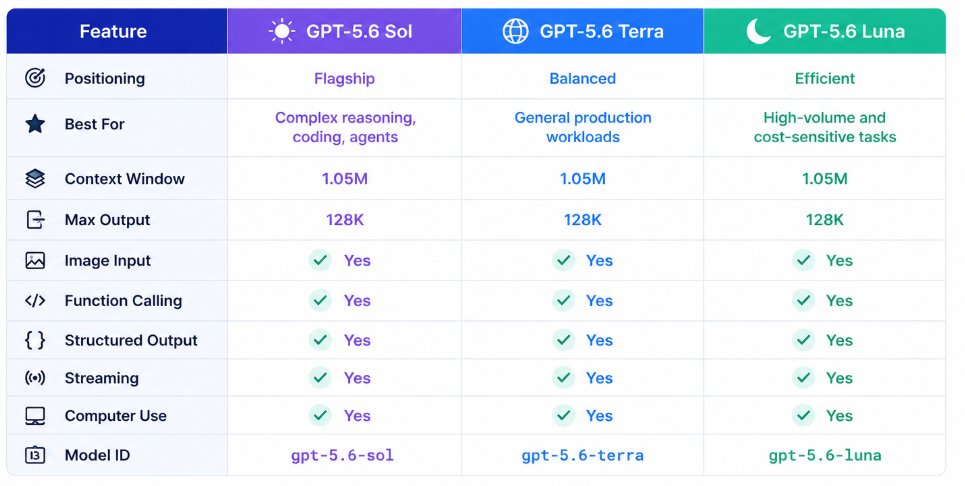
OpenAI recommends Sol when developers need frontier reasoning and coding performance, Terra when balancing intelligence and cost, and Luna for efficient high-volume applications.
GPT-5.6 Sol
GPT-5.6 Sol is the family’s flagship model, intended for workloads where achieving the highest possible quality is more important than minimizing cost or latency.
Typical use cases include:
- Complex software engineering
- Long-horizon coding agents
- Scientific reasoning
- Professional analysis
- Cybersecurity research
- Multi-step planning
- Tool-heavy agents
- Complex document analysis
- Computer-use workflows
OpenAI describes Sol as its frontier model for complex professional work and highlights improvements in coding, knowledge work, cybersecurity, science, computer use, and design judgment.
When Should You Use Sol?
Sol is best suited to tasks that require extensive reasoning or where an incorrect result could have serious consequences.
For example:
Large Repository
↓
Identify Architecture
↓
Find Root Cause
↓
Modify Multiple Files
↓
Run Tests
↓
Inspect Failures
↓
Iterate
Workflows like this require the model to use tools effectively, maintain context, and reason across a long sequence of actions.
GPT-5.6 Terra
Terra provides a middle ground between Sol’s advanced capabilities and Luna’s focus on efficiency.
OpenAI describes it as the model that balances intelligence and cost. Its performance is intended for production applications that need strong capability without paying flagship-model prices for every request.
Terra is a strong candidate for:
- Daily coding
- Pull request review
- Knowledge work
- Research
- Document analysis
- Customer-facing AI applications
- Business automation
- General-purpose agents
For many production teams, Terra is a practical model to evaluate first.
The strongest available model is not always the best default choice. In production, the better option is often the model that meets the required quality level while maintaining acceptable cost and latency.
GPT-5.6 Luna
GPT-5.6 Luna is designed for high-volume and cost-sensitive workloads.
Its lower cost makes it suitable for applications that process large volumes of relatively straightforward requests.
Potential workloads include:
- Classification
- Extraction
- Chatbots
- Content moderation workflows
- Routing
- Simple coding tasks
- Summarization
- High-volume customer support
- Lightweight agents
OpenAI currently describes Luna as its fastest and most cost-efficient GPT-5.6 model.
A production system might therefore use Luna for the majority of routine tasks while escalating more difficult requests to Terra or Sol.
Model Routing with GPT-5.6
Having three capability tiers gives developers more flexibility when designing a model-routing system.
Instead of:
Every Request
↓
GPT-5.6 Sol
developers can design:
Incoming Request
↓
Task Analysis
↓
┌─────────────┬───────────────┐
↓ ↓ ↓
Routine Standard Complex
↓ ↓ ↓
Luna Terra Sol
This approach can help teams balance:
- Quality
- Cost
- Latency
- Scalability
For example, a coding platform might use Luna for code explanation, Terra for routine refactoring, and Sol for repository-level debugging.
1.05M-Token Context Window
Sol, Terra, and Luna each support a context window of up to 1,050,000 tokens, making it possible to process large collections of code, documents, and other information within one workflow.
The models also support up to 128,000 output tokens.
Large context can be useful for:
- Full code repositories
- Long technical documentation
- Research collections
- Legal documents
- Financial reports
- Agent execution histories
- Multiple files
- Long conversations
For example, a coding agent could work with the following information during the same workflow:
Repository
+
Documentation
+
Issue History
+
Git Diff
+
Test Results
+
Previous Tool Calls
within the same overall workflow.
However, the 1.05-million-token limit should be treated as a maximum capacity rather than a target for every request.
Sending unnecessary context can increase:
- Latency
- Cost
- Noise
- Prompt complexity
Even with a million-token context window, retrieval, filtering, summarization, and careful context selection remain important.
Reasoning Controls
GPT-5.6 supports configurable reasoning effort.
The official API guidance lists:
- none
- low
- medium
- high
- xhigh
- max
OpenAI recommends choosing reasoning effort deliberately based on task complexity rather than defaulting to the highest setting.
Developers could use the following settings as a starting point:
|
Workload |
Suggested Starting Point |
|
Classification |
none / low |
|
Simple chat |
low |
|
General development |
medium |
|
Difficult coding |
high |
|
Complex analysis |
xhigh |
|
Quality-first frontier tasks |
max |
The final choice should be based on testing with the application’s actual workloads.
GPT-5.6 Ultra and Multi-Agent Workflows
For especially demanding workloads, GPT-5.6 can also be used in multi-agent configurations that divide a complex task across several parallel workstreams.The launch documentation says the default ultra configuration coordinates four agents in parallel.
Conceptually:
Complex Task
↓
Sol
↓
┌────┬────┬────┐
↓ ↓ ↓ ↓
Agent Agent Agent Agent
1 2 3 4
↓ ↓ ↓ ↓
Parallel Exploration
↓
Synthesize Results
This approach is useful when several parts of a problem can be investigated at the same time.
Examples include:
- Complex research
- Repository debugging
- Cybersecurity analysis
- Large planning tasks
- Multi-source investigation
In the API, OpenAI says developers can build similar parallel-agent workflows using the multi-agent beta in the Responses API.
Ultra should not automatically be used for every request because parallel agents can increase token consumption.
Programmatic Tool Calling
GPT-5.6 is designed to support workflows that involve tool use as well as text generation.
OpenAI says GPT-5.6 can write and execute lightweight programs that coordinate tools, process intermediate results, track progress, and decide what to do next.
A traditional tool workflow might look like:
Model
↓
Tool Call
↓
Application
↓
Tool Result
↓
Model
↓
Another Tool Call.
Programmatic Tool Calling allows the model to process intermediate results and coordinate multiple tool interactions with less back-and-forth between the model and the application.
This is especially useful when:
- Search returns many results
- Database queries return large datasets
- Agents use several tools
- Workflows have repeated intermediate steps
Coding and Software Engineering
Coding and software engineering are among the main areas of focus for GPT-5.6.
OpenAI reports that GPT-5.6 Sol with max reasoning reaches an Artificial Analysis Coding Agent Index score of 80. The company also reports strong performance on Terminal-Bench 2.1 and DeepSWE, which focus on command-line agents and long-running software-engineering work.
GPT-5.6 can be used for:
- Code generation
- Repository analysis
- Debugging
- Refactoring
- Code review
- Test generation
- Terminal workflows
- Application migration
- Frontend development
- Tool-using coding agents
In practice, coding models are moving beyond isolated code-generation requests such as:
“Generate this function.”
toward:
“Inspect this project, find the issue, fix the implementation, run the tests, and verify the result.”
Completing this type of task requires planning, tool use, debugging, and verification rather than simple code completion.
GPT-5.6 Benchmarks
Benchmarks are useful for comparing models, but production decisions should still be based on real application workloads.
OpenAI reports the following GPT-5.6 results:
|
Benchmark |
Sol |
Terra |
Luna |
GPT-5.5 |
|
Agents' Last Exam |
52.7% |
50.4% |
50.3% |
46.9% |
|
SWE-Bench Pro |
64.6% |
63.4% |
62.7% |
59.4% |
|
DeepSWE v1.1 |
72.7% |
69.6% |
67.2% |
67.0% |
|
Terminal-Bench 2.1 |
88.8% |
87.4% |
84.7% |
85.6% |
|
BrowseComp |
90.4% |
87.5% |
83.3% |
84.4% |
|
GPQA Diamond |
94.6% |
92.9% |
92.3% |
93.6% |
These numbers are OpenAI-reported evaluation results and should not be interpreted as guarantees for every production task.
The results show two notable patterns.
Terra performs relatively close to Sol on several practical coding benchmarks, while Luna retains substantial capability despite its focus on lower-cost, high-volume workloads.
Teams should therefore test all three models on their own workloads rather than assuming that every request should be handled by Sol.
Multimodal Capabilities
GPT-5.6 supports:
- Text input
- Image input
- Text output
Audio and video are not native input modalities for these models according to the current API model documentation.
Support for image input makes GPT-5.6 suitable for tasks such as:
- Screenshot debugging
- Document analysis
- Chart interpretation
- Visual QA
- Interface analysis
- Diagram understanding
For example:
Screenshot
+
Code
+
User Question
↓
GPT-5.6
↓
Visual + Technical Analysis
This is particularly useful for coding tools that need to analyze screenshots, interfaces, or other visual elements of frontend applications.
Computer Use
GPT-5.6 can also support computer-use workflows.
Computer-use agents can interact with graphical environments and complete workflows involving websites, software applications, and interfaces.
Potential applications include:
- Browser automation
- Data-entry assistance
- Application testing
- Research workflows
- Business automation
OpenAI reports a GPT-5.6 Sol result of 62.6% on OSWorld 2.0, an evaluation designed around computer-use tasks.
In production, computer-use systems should include appropriate permission controls and require human approval before consequential actions are performed.
GPT-5.6 vs GPT-5.5
Compared with GPT-5.5, GPT-5.6 introduces several practical improvements beyond overall model capability.
Key changes include:
- More distinct model tiers
- Better token efficiency
- Stronger agentic coding
- Improved computer use
- Programmatic Tool Calling
- Multi-agent execution
- Stronger design judgment
- Additional reasoning control
OpenAI's migration guidance recommends starting with the same reasoning effort used with GPT-5.5 and then testing one level lower because GPT-5.6 can often maintain or improve quality with fewer tokens.
Using fewer reasoning tokens while maintaining the required quality can make a significant difference at production scale.
Which GPT-5.6 Model Should You Choose?
When to Choose GPT-5.6 Sol
Use Sol for:
- Complex coding
- Deep reasoning
- Scientific analysis
- Advanced agents
- Hard research
- Computer use
- Quality-first production tasks
Sol should be evaluated when failure costs are high or tasks cannot easily be solved with smaller models.
When to Choose GPT-5.6 Terra
Use Terra for:
- General development
- Business workflows
- Knowledge work
- Document analysis
- Production chat applications
- Standard agents
- Cost-aware reasoning workloads
For many applications, Terra can be an effective default.
When to Choose GPT-5.6 Luna
Use Luna for:
- High-volume requests
- Classification
- Extraction
- Simple chat
- Routing
- Summarization
- Lightweight coding
- Cost-sensitive applications
Luna is particularly useful for high-volume applications where per-token pricing has a significant effect on operating costs.
GPT-5.6 API Pricing
OpenAI's API pricing has changed since GPT-5.6 initially launched, so developers should use current documentation rather than relying on launch-day pricing.
As of August 2026, the official model documentation lists:
|
Model |
Input / 1M Tokens |
Cached Input |
Output / 1M Tokens |
|
GPT-5.6 Sol |
$4.00 |
$0.40 |
$20.00 |
|
GPT-5.6 Terra |
$2.00 |
$0.20 |
$12.00 |
|
GPT-5.6 Luna |
$0.20 |
$0.02 |
$1.20 |
OpenAI notes that Sol's current reduced pricing is promotional and expected to remain available at least through November 21, 2026. Pricing may therefore change again.
Always verify current pricing before making production cost estimates.
How to Use GPT-5.6 Through ApiSmart
ApiSmart provides a unified API platform for accessing multiple leading AI models through a centralized interface.
Developers can integrate GPT-5.6 through ApiSmart in four steps.
Step 1: Create an ApiSmart Account
Create an ApiSmart account and access the developer dashboard.
From there, you can manage API credentials and explore supported models.
Step 2: Generate an API Key
Generate an API key for your application.
Store the credential securely:
export APISMART_API_KEY="YOUR_APISMART_API_KEY"
Never expose production API keys in:
- Public GitHub repositories
- Client-side JavaScript
- Screenshots
- Public documentation
Use environment variables or a dedicated secrets-management system.
Step 3: Select a GPT-5.6 Model
Choose the model that fits your workload.
For example:
gpt-5.6-sol
gpt-5.6-terra
gpt-5.6-luna
Before deployment, confirm the exact model ID currently available through ApiSmart.
Step 4: Configure the ApiSmart Endpoint
For OpenAI-compatible integrations, configure your application with the ApiSmart endpoint:
https://gw.apismart.ai/v1
The integration depends mainly on three configuration values:
API Key
+
Base URL
+
Model ID
Using these shared configuration values makes it easier to access GPT-5.6 alongside other models without building a separate client architecture for every provider.
GPT-5.6 API Python Example
Install the OpenAI Python SDK:
pip install openai
Then create the client:
from openai import OpenAI
import os

client = OpenAI(
    api_key=os.environ["APISMART_API_KEY"],
    base_url="https://gw.apismart.ai/v1"
)

response = client.chat.completions.create(
    model="gpt-5.6-terra",
    messages=[
        {
            "role": "system",
            "content": "You are an expert software engineering assistant."
        },
        {
            "role": "user",
            "content": "Review this architecture and identify potential scalability issues."
        }
    ]
)

print(response.choices[0].message.content)
For production use, confirm the supported endpoint and model identifier in the current ApiSmart documentation.
GPT-5.6 API cURL Example
Developers can also test GPT-5.6 with cURL:
curl https://gw.apismart.ai/v1/chat/completions \
  -H "Authorization: Bearer $APISMART_API_KEY" \
  -H "Content-Type: application/json" \
  -d '{
    "model": "gpt-5.6-terra",
    "messages": [
      {
        "role": "user",
        "content": "Explain when to use Sol, Terra, and Luna."
      }
    ]
  }'
Before integrating the API into an application, developers can use cURL to check:
- Authentication
- Model availability
- Endpoint configuration
- Request formats
- Error responses
Why Use ApiSmart for GPT-5.6?
Access Multiple AI Models Through One API
Production applications often need to support additional models as their requirements evolve.
A development team may eventually need models for:
- Reasoning
- Coding
- Images
- Video
- Multimodal understanding
- High-volume inference
ApiSmart provides a centralized platform for accessing multiple AI models rather than requiring a completely separate integration stack for every provider.
OpenAI-Compatible Integration
Existing OpenAI SDK-based applications can continue using familiar request patterns.
For compatible models, changing providers or models primarily involves:
API Key

Base URL

Model ID
This can make experimentation and migration significantly easier.
Flexible Model Selection
The three GPT-5.6 tiers demonstrate the value of flexible model selection.
Different requests may need:
Luna → Low-cost routine work
Terra → Balanced production work
Sol → Complex reasoning and coding
With a unified API, developers can treat model selection as a routing decision instead of maintaining a separate integration for each model.
Centralized API Management
ApiSmart helps reduce the complexity of managing:
- Authentication
- API access
- Model selection
- Model switching
- Multi-model integrations
This is particularly useful for applications that regularly evaluate new models.
GPT-5.6 Use Cases
Coding Agents
Use GPT-5.6 for workflows such as:
- Repository analysis
- Debugging
- Refactoring
- Code review
- Terminal execution
- Test generation
- Long-running coding agents
Sol is the strongest choice for difficult tasks, while Terra may be better for routine production development.
Research Agents
GPT-5.6 can combine long context with web search, file search, and other tools to support:
- Competitive research
- Literature review
- Financial research
- Technical analysis
- Report generation
Enterprise Knowledge Systems
Its 1.05M context window makes GPT-5.6 suitable for systems combining large internal knowledge collections with retrieval.
Possible applications include:
- Employee assistants
- Internal documentation search
- Policy analysis
- Enterprise research
- Document comparison
Customer Support
High-volume customer support can use model routing:
Routine Request → Luna
Complex Support Case → Terra
Critical Investigation → Sol
This provides a practical way to balance quality and operating cost.
Professional Workflows
GPT-5.6 can also support:
- Financial analysis
- Consulting workflows
- Report preparation
- Presentation creation
- Data interpretation
- Document review
The model family is specifically positioned around completing multi-step professional work rather than only generating isolated responses.
Best Practices for GPT-5.6 API
1. Don't Use Sol for Everything
Start by identifying the minimum capability required.
If Luna or Terra meets your quality target, sending every request to Sol can unnecessarily increase cost.
2. Test Reasoning Levels
The max setting may provide additional reasoning, but it will not necessarily offer the best balance of quality, latency, and cost in production.
Evaluate:
low

medium

high

xhigh

max
using real tasks.
3. Use Retrieval with Large Context
A million-token context window does not eliminate the need for good context management.
Retrieve relevant information first whenever possible.
4. Monitor Token Usage
Measure:
- Input tokens
- Output tokens
- Cached tokens
- Cost per request
- Cost per successful task
Production costs depend on token efficiency and task-completion rates, not only on the advertised price per token.
5. Evaluate Models on Your Own Data
Benchmark tables cannot fully predict production performance.
Create a representative evaluation dataset and measure:
- Accuracy
- Reliability
- Latency
- Cost
- Tool-use performance
- Completion rate
GPT-5.6 FAQ
What is GPT-5.6?
GPT-5.6 is OpenAI's frontier model family released for general availability in July 2026. It includes Sol, Terra, and Luna, which target different capability, latency, and cost requirements.
What is the difference between GPT-5.6 Sol, Terra, and Luna?
Sol is the flagship model for demanding reasoning and coding. Terra balances capability and cost. Luna is optimized for high-volume, cost-sensitive applications.
What is the GPT-5.6 context window?
GPT-5.6 Sol, Terra, and Luna each support a 1,050,000-token context window and up to 128,000 output tokens.
Does GPT-5.6 support images?
Yes. The GPT-5.6 family supports text and image input with text output. Native audio and video input are not listed as supported for these models.
Does GPT-5.6 support tool calling?
Yes. GPT-5.6 supports function calling and a range of tools including web search, file search, computer use, code execution-related tools, and MCP integrations through supported API workflows.
Is GPT-5.6 good for coding?
Yes. Coding and agentic software engineering are among GPT-5.6's primary strengths, with Sol delivering particularly strong published results on coding-agent and terminal benchmarks.
Which GPT-5.6 model should I use?
Start with Terra for general production workloads, Luna for high-volume routine tasks, and Sol for the hardest reasoning or coding problems. Then validate the choice with your own evaluation data.
Can I access GPT-5.6 through ApiSmart?
ApiSmart provides a unified API platform for accessing leading AI models through an OpenAI-compatible interface. Developers should check the current ApiSmart model marketplace for GPT-5.6 availability, exact model IDs, supported parameters, and pricing before production deployment.
Start Building with GPT-5.6 Through ApiSmart
With three distinct model tiers, developers can choose a GPT-5.6 model according to the level of capability each task requires.
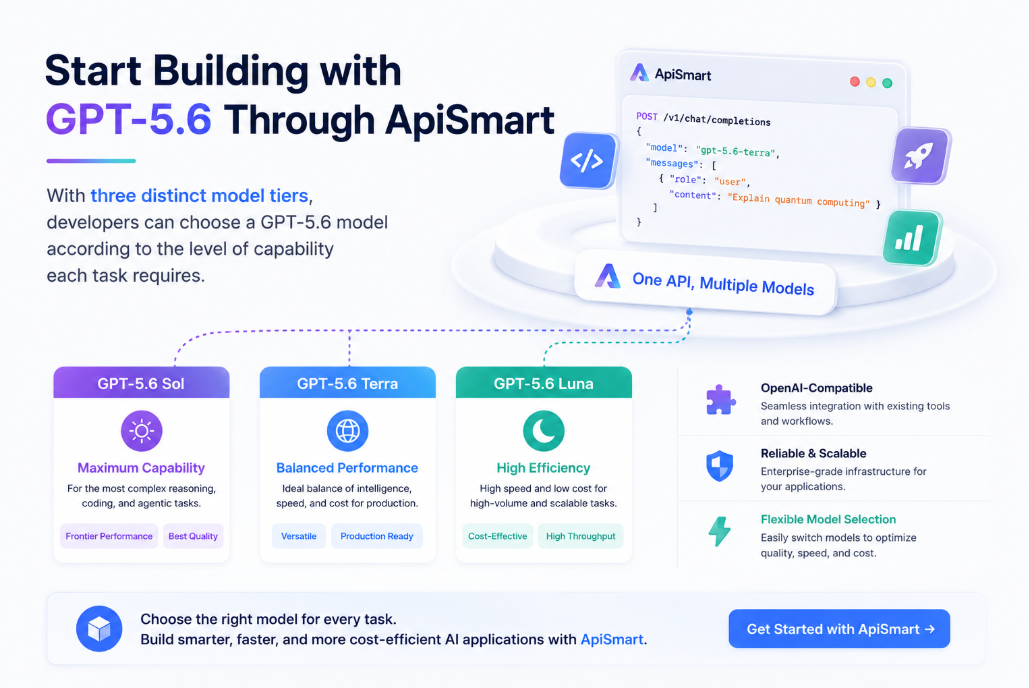
Sol provides frontier capability for demanding coding, reasoning, and agentic workflows. Terra offers a more balanced option for everyday production use. Luna makes the same model generation available to high-volume applications where cost efficiency is critical.
Combined with a 1.05M-token context window, configurable reasoning, multimodal input, computer use, tool calling, and emerging multi-agent workflows, the GPT-5.6 family gives developers a flexible foundation for increasingly capable AI applications.
ApiSmart extends that flexibility beyond one model family by providing a unified, OpenAI-compatible API platform for accessing GPT-5.6 alongside other leading AI models.
This allows developers to select the right model for each task without rebuilding the integration whenever their requirements change.